Headings and paragraphs · 見出しと段落
This page needs a recent browser (with SharedArrayBuffer support). Please update Chrome, Edge, Firefox or Safari to the latest version. · このページには最新のブラウザ(SharedArrayBuffer対応)が必要です。Chrome、Edge、Firefox、Safariを最新バージョンに更新してください。
English
Headings
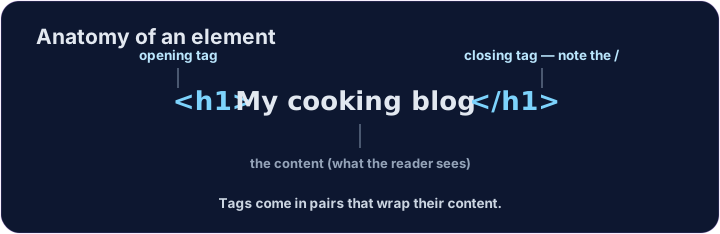
- A heading is a title on your page.
- Use
<h1>for the biggest, most important heading. - Like all HTML, it comes in a pair:
<h1>...</h1>.
日本語
タイトル(見出し)
- タイトル(見出し) は、ページのタイトルです。
- 最大で最も重要な タイトルには
<h1>を使用します。 - HTMLの要素はすべてペアになります:
<h1>...</h1>。
<h1>My cooking blog</h1>
<p>Welcome! Here are my favourite recipes.</p>
English
Six sizes
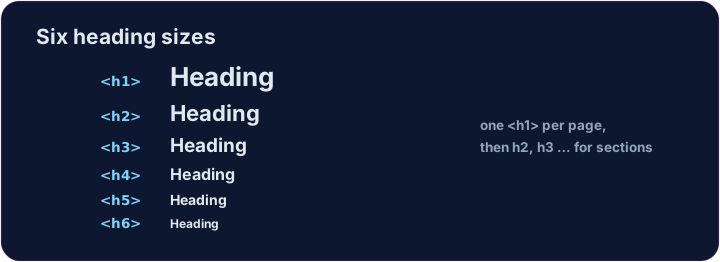
- There are six headings, from
<h1>down to<h6>. <h1>is the largest;<h6>is the smallest.- Use one
<h1>for the page's main title, then smaller ones for sections.
日本語
6つのサイズ
- 見出しは
<h1>から<h6>までの6つあります。 <h1>が 最大 で、<h6>が 最小 です。- メインタイトルに 1つだけ
<h1>を使い、セクションには小さいものを使います。
<h1>Biggest</h1>
<h2>Smaller</h2>
<h3>Smaller still</h3>
English
Common mistakes
- Headings run
<h1>(biggest) to<h6>— do not pick one just for its size. - A paragraph is
<p>...</p>.
日本語
よくあるミス
- 見出しは
<h1>(最大)から<h6>(最小)まであります。サイズだけで選ぶのではなく、意味に合わせて選んでください。 - パラグラフは
<p>...</p>です。
English
Now you try
- A page is just headings and paragraphs stacked together.
- Build the two little tasks below.
日本語
あなたも試してみよう
- ページとは、見出しとパラグラフが積み重なったものです。
- 下の2つの小さなタスクを作ってみましょう。
Add a big heading that says My Blog. Use an <h1> … </h1> pair. · **「My Blog」** という大きな見出しを追加する。<h1> … </h1> ペアを使用。
Make a heading About me, and under it a paragraph that says I love coding. · About me という見出しを作り、その下に 「I love coding.」 という段落を作る。