Normalisation
Why normalise?
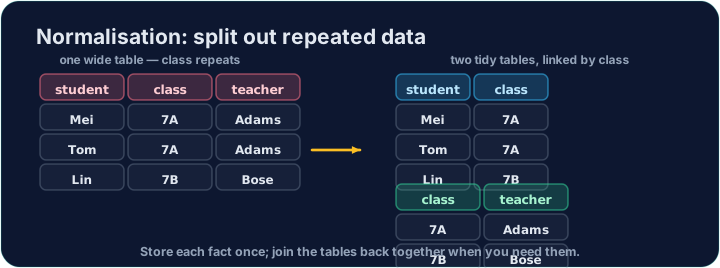
Imagine storing every club booking in one table, with the coach repeated on every row: each booking of the Chess club would carry "Mr Ng" again and again.
That repetition causes problems. If Mr Ng leaves, you must update many rows; miss one and the data becomes inconsistent. Normalisation organises tables to remove this kind of redundancy.
なぜ正規化なのか?
すべてのクラブ予約を1つのテーブルに格納し、コーチを各行に繰り返して記載することを想像してください。チェスクラブの各予約に「Ng先生」が繰り返し表示されることになります。
この重複が問題を引き起こします。Ng先生が退職した場合、多くの行を更新する必要がありますが、1つ見落とすとデータが不整合になります。正規化は、このような重複を除去するためにテーブルを整理する手法です。
The normal forms
You normalise in steps:
- 1NF — every cell holds a single value (no lists or repeating groups), and the table has a primary key.
- 2NF — already 1NF, and no non-key column depends on only part of a composite key.
- 3NF — already 2NF, and no non-key column depends on another non-key column (no transitive dependency).
In the one-table version, coach depends on the club, not on the booking — a transitive dependency, so it is not in 3NF.
正規形
正規化は段階的に行います:
- 1NF — 各セルに単一の値が入っており(リストや重複グループなし)、テーブルには主鍵があります。
- 2NF — すでに1NFであり、非鍵カラムが複合主鍵の一部に依存していません。
- 3NF — すでに2NFであり、非鍵カラムが別の非鍵カラムに依存していません(伝達依存はありません)。
1つのテーブル版では、coach は ⟨club⟩ に依存しており、予約そのものではありません。これは伝達依存であるため、3NFには含まれていません。
The normalised design
We split the data into two tables (the ones loaded here):
club(club_id, name, coach)— each club and its coach, stored once.booking(booking_id, student, club_id)— each booking, linked by the foreign keyclub_id.
Now a coach is stored once. A JOIN puts the information back together whenever you need it — write that join below.
正規化された設計
データを2つのテーブルに分割しました(ここで読み込まれたもの):
club(club_id, name, coach)— 每个俱乐部及其教练各存储一次。booking(booking_id, student, club_id)— 各予約を外部キーclub_idでリンクします。
データは一度だけ保存されます。 JOIN が必要なたびに情報を再構成します — 以下の join を書きなさい。
Common mistakes
- Split repeating groups into their own table instead of many similar columns.
- Each table should describe one kind of thing.
よくあるミス
- 重複するグループを多数の類似列ではなく、独自のテーブルに分割します。
- 各テーブルは1つの種類のものを記述すべきです。
Reassemble the data: list each booking's student next to their club's coach, by joining booking to club on club_id, ordered by booking.booking_id.
Click Run to see the output here. · 実行ボタンをクリックして出力を確認してください。
The split tables still answer questions together. Count how many bookings each club has: join booking to club, show club.name and COUNT(*) AS bookings, group by the club, and order by club.name.
Click Run to see the output here. · 実行ボタンをクリックして出力を確認してください。