Creating tables · テーブルの作成
Two kinds of SQL command
SQL has two halves:
- DDL (Data Definition Language) changes the structure — the tables themselves.
- DML (Data Manipulation Language) works with the data inside the tables — reading it with
SELECT, and adding, changing, or removing it withINSERT/UPDATE/DELETE. Everything so far (SELECT) is DML.
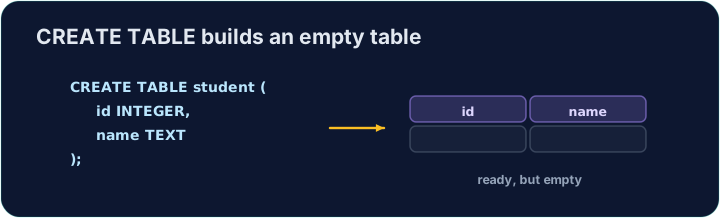
CREATE TABLE is the main DDL command. It lists each column with a data type and marks the primary key:
SQLコマンドの2種類
SQLには2つの部分があります:
- DDL (Data Definition Language) は構造——すなわちテーブルそのもの——を変更します。
- DML (Data Manipulation Language) はテーブル内のデータを操作します。
SELECTで読み出し、INSERT/UPDATE/DELETEで追加・変更・削除を行います。これまでに見たすべて(SELECT)は DML です。
CREATE TABLE は主要な DDL コマンドです。各カラムをデータ型で指定し、主鍵をマークします:
CREATE TABLE customer (
  id   INTEGER PRIMARY KEY,
  name VARCHAR(20),
  city VARCHAR(15)
);
Data types and foreign keys
Common data types:
INTEGER— whole numbersVARCHAR(n)/CHAR(n)— text, up to / exactlyncharactersDECIMAL(p, s)— a number withsdecimal placesDATE,BOOLEAN
To link to another table, add a FOREIGN KEY:
The checker reads back your table's structure to see which columns you created.
データ型と外部キー
一般的なデータ型:
INTEGER— 整数VARCHAR(n)/CHAR(n)— テキスト、最大 / 正確にn文字までDECIMAL(p, s)—s桁の小数点を持つ数値DATE,BOOLEAN
別のテーブルにリンクさせるには、FOREIGN KEY を追加します:
CREATE TABLE orders (
  id          INTEGER PRIMARY KEY,
  customer_id INTEGER,
  FOREIGN KEY (customer_id) REFERENCES customer(id)
);
チェッカーはあなたのテーブルの構造を読み返して、作成したカラムを確認します。
Common mistakes
- Every column needs a data type (e.g.
INTEGER,TEXT). - Declare the PRIMARY KEY when you create the table.
よくあるミス
- 各カラムにはデータ型が必要です(例:
INTEGER,TEXT)。 - テーブル作成時に PRIMARY KEY を宣言します。
Create a table called teacher with three columns: id (INTEGER, the primary key), name (VARCHAR(20)), and subject (VARCHAR(15)). · 3つのカラムを持つ teacher テーブルを作成する:id (INTEGER、主キー)、name (VARCHAR(20))、subject (VARCHAR(15))。
Click Run to see the output here. · 実行ボタンをクリックして出力を確認してください。
Design another table. Create event with id (INTEGER PRIMARY KEY), title (VARCHAR(30)), and price (DECIMAL(6,2) — a money column with 2 decimal places). · もう一つのテーブルを設計する。event をid (INTEGER PRIMARY KEY)、title (VARCHAR(30))、price (DECIMAL(6,2) — 小数点以下2桁の金銭カラム) で作成する。
Click Run to see the output here. · 実行ボタンをクリックして出力を確認してください。