Grouping with GROUP BY · GROUP BYによるグループ化
Grouping rows with GROUP BY
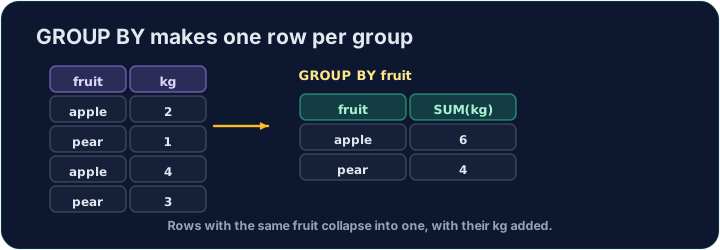
An aggregate like AVG normally summarises the whole table into one number. GROUP BY splits the rows into groups that share a value, and gives one summary row per group:
This gives one row for each form, with that form's count and average.
GROUP BY による行のグループ化
AVG のような集計関数は通常、全体の表を単一の数値に要約します。GROUP BY は共有する値を持つ行をグループに分割し、グループごとに1行ずつ要約結果を返します:
SELECT form, COUNT(*) AS n, ROUND(AVG(score), 2) AS avg_score
FROM student
GROUP BY form;
これにより、各 form に対して1行ずつ返され、そのクラスの人数と平均が含まれます。
Filtering groups with HAVING
WHERE filters rows before grouping. To filter the groups themselves — using an aggregate — use HAVING:
This keeps only forms with 3 or more students. (WHERE cannot test COUNT(*); HAVING can.)
HAVING によるグループのフィルタリング
WHERE はグループ化前に行をフィルタリングします。グループ自体をフィルタリングしたい場合(集計関数を使用して)、HAVING を使用します:
SELECT form, COUNT(*) AS n
FROM student
GROUP BY form
HAVING COUNT(*) >= 3;
これにより、3人以上の生徒がいるクラスのみが残ります。(WHERE は COUNT(*) をテストできません;HAVING は可能。)
Common mistakes
- Filter groups with
HAVING, rows withWHERE. - A plain column beside an aggregate must be in
GROUP BY.
よくあるミス
- グループをフィルタリングするには
HAVINGを、行をフィルタリングするにはWHEREを使用します。 - 集計関数の横にある通常のカラムは、
GROUP BYに含まれている必要があります。
For each form, show the form, the number of students as n, and the average score (2 d.p.) as avg_score. Group by form. · 各formについて、クラス、生徒数(n)、平均得点(小数点以下2桁:avg_score)を表示する。form でグループ化。
Click Run to see the output here. · 実行ボタンをクリックして出力を確認してください。
Show each form and its student count n, but only for forms with 3 or more students. Use HAVING. · 各formとその生徒数nを表示するが、3人以上のクラスのみ表示する。HAVING を使用。
Click Run to see the output here. · 実行ボタンをクリックして出力を確認してください。