Counting and averaging · カウントと平均値
Summarising with aggregate functions
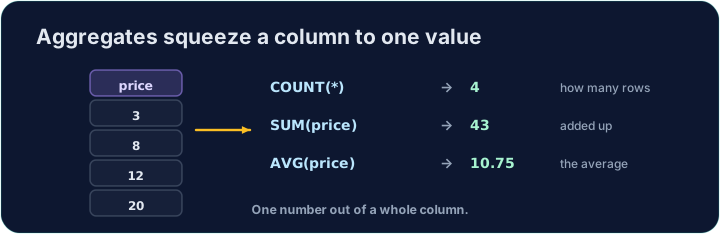
Sometimes you do not want the rows themselves, but a summary of them. Aggregate functions turn many rows into a single value:
COUNT(*)— how many rowsSUM(col)— the totalAVG(col)— the averageMIN(col)/MAX(col)— the smallest / largest
集計関数による要約
時折、行そのものではなく、それらの要約が欲しい場合があります。集計関数は多数の行を単一の値に変換します:
COUNT(*)— 行数のカウントSUM(col)— 合計AVG(col)— 平均MIN(col)/MAX(col)— 最小値 / 最大値
SELECT COUNT(*) FROM student;
Naming and rounding the result
Give the result a clear heading with AS. Averages often have long decimals, so wrap them in ROUND(value, 2) to keep 2 decimal places:
You can combine several aggregates in one query.
結果への名前付けと丸め
AS で結果に明確な見出しを付けます。平均値は小数点以下が長くなることが多いため、2桁に保つために ROUND(value, 2) で囲みます:
SELECT COUNT(*) AS n, ROUND(AVG(score), 2) AS avg_score
FROM student;
複数の集計を一つのクエリに組み合わせることができます。
Common mistakes
COUNT(*)counts rows;AVG(col)averages a column.- Round an average with
ROUND(x, 2).
よくあるミス
COUNT(*)统计行数;AVG(col)计算列的平均值。ROUND(x, 2)で平均値を丸めます。
In one query, show how many students there are as n, and their average score (to 2 decimal places) as avg_score. · 単一クエリで、全生徒数をnとして表示し、平均得点(小数点以下2桁)をavg_scoreとして表示する。
Click Run to see the output here. · 実行ボタンをクリックして出力を確認してください。
Show the lowest score as lowest, the highest as highest, and the total of all scores as total. · 最低得点をlowest、最高得点をhighest、全得点の合計をtotalとして表示する。
Click Run to see the output here. · 実行ボタンをクリックして出力を確認してください。