プロジェクト: ハンマン
このページには最新のブラウザ(SharedArrayBuffer対応)が必要です。Chrome、Edge、Firefox、Safariを最新バージョンに更新してください。
プロジェクト: ハングマン
- 最後のプロジェクトはコース全体を組み合わせたハングマンゲームです。
- 単語を1文字ずつ推測します。5回間違えると負けです。
- 文字列、リスト、
in、関数、whileループ、input()を使います。
作成するもの
a
_a_
z
_a_
t
_at
c
cat
You won!
まず計画を立てる
- ループを書く前に、2つの小さな関数を書いてテストします:
mask(word, guessed)は未推測の文字を_で表した_state_ を表示します。is_won(word, guessed)はすべての文字が推測済みかどうかを言います。- そうすればゲームループはそれらを呼び出すだけになります。
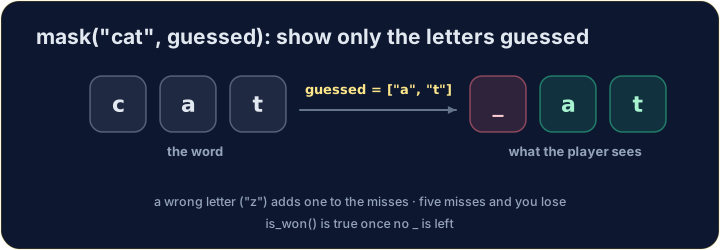
ステップ1: 文字ごとに文字列を作る
- 空の文字列
""から始めます。 - 単語をループして、毎回末尾に文字、または
_を追加します。 letter in guessedはリストにその文字が含まれている場合Trueです。
ステップ2: 分かったらすぐに停止する
- 文字をループで確認する。
guessedに含まれていない文字があれば、return Falseで直ちに終了する。 - ループが完了し、欠けているものがない場合:
return True。
ステップ3: ゲームループ
- 不正な推測が5回未満であり、かつ正解していない間、while条件で続ける。
- ループ内では:文字を入力して記憶に留め、不正であればカウントし、マスクを表示する。
- ループ終了後、一つの
ifが勝利メッセージと敗北メッセージのどちらを表示するかを決定する。
本番で遊ぶ
- コンピュータはリストから秘密の単語を選ぶ。一度に1文字ずつ入力する。
English
import random

def mask(word, guessed):
    result = ""
    for letter in word:
        result = result + (letter if letter in guessed else "_")
    return result

word = random.choice(["python", "loop", "list", "print"])
guessed = []
wrong = 0
while wrong < 5 and mask(word, guessed) != word:
    letter = input("Guess a letter: ")
    guessed.append(letter)
    if letter not in word:
        wrong = wrong + 1
    print(mask(word, guessed), "   wrong:", wrong)
print("You won!" if mask(word, guessed) == word else "You lost! The word was " + word)
今、作ってみましょう
- 3つのステップだ。コースの最後まで到達したことをおめでとう!
難易度 4/5 · 280 コイン + 今日初回達成時の小ボーナス
Step 1 : write mask(word, guessed) that 回报(利回り) the word with every letter that is not in the list guessed replaced by _ . mask("python", ["p", "o"]) is "p___o_" .
実行ボタンをクリックして出力を確認してください。
難易度 4/5 · 280 コイン + 今日初回達成時の小ボーナス
Step 2 : write is_won(word, guessed) that 回报(利回り) True when every letter of the word is in guessed , otherwise False .
実行ボタンをクリックして出力を確認してください。
難易度 4/5 · 280 コイン + 今日初回達成時の小ボーナス
Step 3 : the game. The word is cat . Read one letter per line with input() and add it to guessed . After each guess print the mask. Count the wrong guesses. Stop when the word is guessed (print You won! ) or after 5 wrong guesses (print You lost! The word was cat ). For the guesses a, z, t, c, the output is _a_, _a_, _at, cat, You won! .
実行ボタンをクリックして出力を確認してください。