Getting input · 入力の取得
Ask the user with input
input()waits for the user to type a line and press Enter.- It gives back what they typed. Store it in a variable.
- Join two strings together with
+.
input でユーザーに質問する
input()は、ユーザーが入力した行とエンターキー入力を待機します。- 入力を返します。それを変数に格納してください。
+で2つのストリングを结合在一起できます。
name = input()
print("Welcome, " + name)
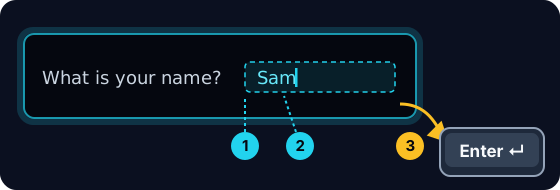
When your program waits
- When you press Run, the program stops at
input()and waits for you. - A highlighted box appears under the code: type here, then press Enter.
- Click the box, type your answer and press Enter. Then the program continues.
プログラムが入力を待っている時
- 実行 を押すと、プログラムは
input()で停止してあなたの入力を待ちます。 - コードの下にハイライトされたボックスが表示されます:ここにタイプし、Enterキーを押してください。
- ボックスをクリックして答えを入力し、Enterキーを押します。そうするとプログラムは続行します。
input always gives a string
- Whatever the user types comes back as a string.
- Even if they type
5, you get the text"5", not the number. - So
"5" + "5"is"55"(joined text), not10.
input は常にストリングを返す
- ユーザーが入力したものはすべてストリングとして返されます。
- 彼らが
5と入力しても、数値ではなく文字列"5"が返されます。 - つまり
"5" + "5"は"55"(結合されたテキスト)であり、10(数値の合計)ではありません。
print("5" + "5") # 55 — joined text, not the number 10
Turn text into a number
int(...)turns text into a whole number:int("5")→5.float(...)turns text into a decimal:float("2.5")→2.5.- Convert first, then you can do maths.
テキストを数に変換する
int(...)はテキストを整数に変換します:int("5")→5。float(...)は文字列を小数に変換します:float("2.5")→2.5。- まず変換してから、計算を行ってください。
age = int(input())
print(age + 1)
Common mistakes
input()always returns a string, so wrap it inint(...)before doing maths.- The text inside
input("...")is the prompt shown to the user.
よくあるミス
input()は常に文字列を返すので、計算する前にint(...)で包み込んでください。input("...")内のテキストはユーザーに表示されるプロンプトです。
Now you try
- When you Run, type the input yourself in the box and press Enter.
- Check answer types the task's input for you, so just read it with
input(). - Each task needs only one
input().
あなたも試してみよう
- 実行的时候,请在ボックスに手動で入力して Enter キーを押してください。
- 正解確認 はタスクの入力を自動で入力するため、
input()で表示内容を確認するだけで構いません。 - 各タスクには
input()が1つ必要です。
Input → process → output · 入力 → 処理 → 出力
Most programs follow one shape: get input, do something, show output. · ほとんどのプログラムは以下の形式に従います:入力を受け取って、処理を行い、出力を表示する。
Read a name with input(), then print Hi, then the name then !. For the input Sam, the output should be Hi, Sam!. · input()で名前を読み込み、次にHi, 、その後名前の後、!を出力してください。入力Samに対しては、出力がHi, Sam!になるはずです。
Click Run to see the output here. · 実行ボタンをクリックして出力を確認してください。
Read a whole number with input(), convert it with int(...), then print the number plus 100. For input 7, the output should be 107. · input() で整数を読み込み、int(...) で変換してから、数字に100を加えたものを出力してください。入力が 7 の場合、出力は 107 になるはずです。
Click Run to see the output here. · 実行ボタンをクリックして出力を確認してください。
Read a whole number, convert it with int(...), then print its square (the number times itself). For input 5, the output should be 25. · 整数を読み込み、int(...) で変換してから、二乗(その数自身との積)を出力してください。入力が 5 の場合、出力は 25 になるはずです。
Click Run to see the output here. · 実行ボタンをクリックして出力を確認してください。
Read the width, then the height, each with int(input()). Print the area on one line and the perimeter on the next. For the inputs 3 and 5 the output is Area: 15 and Perimeter: 16. · int(input()) で幅、次に高さを読み取ってください。面積を1行目に、周長を次の行に出力してください。入力が 3 と 5 の場合、出力は Area: 15 と Perimeter: 16 になります。
Click Run to see the output here. · 実行ボタンをクリックして出力を確認してください。