Programs and processes
This page needs a recent browser (with SharedArrayBuffer support). Please update Chrome, Edge, Firefox or Safari to the latest version. · このページには最新のブラウザ(SharedArrayBuffer対応)が必要です。Chrome、Edge、Firefox、Safariを最新バージョンに更新してください。
English
What is a process?
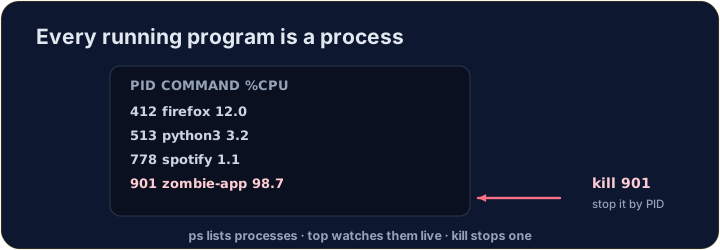
- A process is a running program. Your browser, your editor, and the shell itself are all processes.
- Each has a number — a PID (process ID) — that the system uses to keep track of it.
- (These commands talk to the real operating system, so they aren't part of our simulator — but here is what you'll use on a real machine.)
日本語
プロセスとは何か?
- プロセス は実行中のプログラムです。ブラウザ、エディタ、シェル自体もすべてプロセスです。
- 各プロセスには番号があり、それを PID (process ID) と呼びます。システムはこの番号を使って追跡します。
- (これらのコマンドは本物のOSと通信するため、当シミュレーターには含まれていませんが、実際のマシンで使用するものです。)
English
Seeing what is running
pslists your processes;ps auxlists all of them.top(or the nicerhtop) shows a live view that updates every second — handy to spot a program using too much CPU or memory:
- Press
qto quittop.
日本語
実行中を確認する
psは あなたの プロセスをリスト表示し、ps auxは すべて のプロセスを表示します。top(またはより見やすいhtop)はリアルタイムで更新されるビューを表示し、秒ごとに値が変わります。CPUやメモリを過剰に消費しているプログラムを見つけるのに便利です。
top
qを押すとtopが終了します。
English
Stopping a process
- If a program is frozen, you can stop it. In the terminal, Ctrl-C stops the program running right now.
- For another process, find its PID with
psand thenkillit:
killpolitely asks the process to stop;kill -9forces it. Use force only as a last resort.
日本語
プロセスの停止
- プログラムがフリーズした場合は停止できます。ターミナルでは、Ctrl-C で現在実行中のプログラムを停止します。
- 他のプロセスについては、
psでその PID を探し、次にkillで停止します:
kill 1234
killは親切にプロセスに停止を依頼しますが、kill -9は強制します。強制は最後の手段としてのみ使用してください。
English
Now you try
ps,topandkilltalk to the real OS, so they are not in our simulator.- Instead, a snapshot of
psoutput is saved inprocesses.txt. Use the file tools you already know —grepandwc— to find the CPU-hog and count the processes.
日本語
あなたも試してみよう
ps、top、killは本物のOSと通信するため、当シミュレーターには含まれていません。- その代わり、
psの出力のスナップショットがprocesses.txtに保存されています。既知のファイル操作ツール —grepとwc— を使ってCPUを大量に消費しているものを探し、プロセス数を数えてください。
English
Common mistakes
pslists running processes;killstops one by its PID.- A trailing
&runs a command in the background.
日本語
よくあるミス
psは実行中のプロセスをリスト表示し、killはPIDに基づいて1つ停止します。- 末尾の
&はコマンドをバックグラウンドで実行します。
You cannot run ps in this simulator, but a teammate saved its output to processes.txt (each line is PID name cpu%). Find the frozen, CPU-hogging firefox line with grep firefox processes.txt.
How many processes were running when the snapshot was taken? Count the lines with cat processes.txt | wc -l.