Users and sudo · ユーザーとsudo
This page needs a recent browser (with SharedArrayBuffer support). Please update Chrome, Edge, Firefox or Safari to the latest version. · このページには最新のブラウザ(SharedArrayBuffer対応)が必要です。Chrome、Edge、Firefox、Safariを最新バージョンに更新してください。
English
Many users, one computer
- Linux was built for many people to share one machine safely.
- Each person has a user account.
whoamitells you who you currently are:
- Your files are yours; other users cannot read or change them unless you allow it.
日本語
多くのユーザー、1台のコンピュータ
- Linuxは多くの人々が1台の機械を安全に共有するために設計されました。
- 各ユーザーにはユーザーアカウントがあります。
whoamiは現在あなたが誰であるかを示します:
whoami
- あなたのファイルはあなたのものであり、許可しない限り他のユーザーが読み取りや変更を行うことはできません。
English
The superuser: root
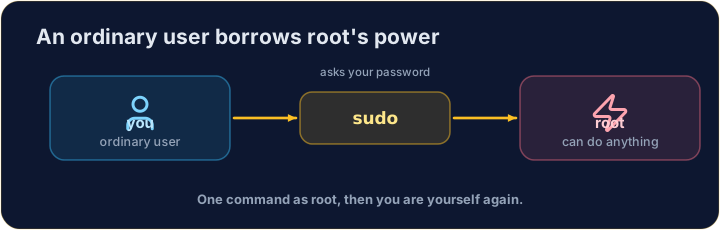
- One special user, root, can do anything — change any file, install software, manage other users.
- With great power comes great danger: a wrong command as root can break the whole system.
- So you normally work as an ordinary user, and only become root when you must.
日本語
スーパーユーザー:root
- root という特別なユーザー1人は 何でも できます — 任意のファイルの変更、ソフトウェアのインストール、他のユーザーの管理など。
- 大きな権限には大きな危険も伴います:rootでの誤ったコマンドはシステム全体を壊す可能性があります。
- そのため通常は一般ユーザーとして作業し、必須の場合のみ rootになります。
English
sudo — borrow root for one command
sudoruns a single command as root (it asks for your password first):
- Think of it as "do this super-user do". Use it only when a task truly needs admin rights — and read the command twice before you press Enter.
日本語
sudo — コマンド1回分だけrootを借りる
sudoは root で単一のコマンドを実行します(まずパスワードの入力を求めます):
sudo apt install git
- "super-user do(スーパーユーザー実行)」と覚えてください。管理権限が本当に必要な場合のみ使用し、Enterを押す前にコマンドを必ず二回読み返してください。
English
Common mistakes
sudoruns one command as the administrator — use it carefully.- Do not put
sudoin front of everything.
日本語
よくあるミス
sudoは管理者として1つのコマンドを実行します。注意して使用してください。sudoをすべてのコマンドの前に置くのは避けてください。
Print the name of the user you are logged in as, with whoami. · whoami を使用して、現在ログイン中のユーザー名を表示します。
Every machine has a name too. Print the name of the computer you are on with hostname. · すべてのコンピュータにも名前があります。hostname を使用して、現在利用中のコンピュータの名前を表示します。