File permissions
This page needs a recent browser (with SharedArrayBuffer support). Please update Chrome, Edge, Firefox or Safari to the latest version. · このページには最新のブラウザ(SharedArrayBuffer対応)が必要です。Chrome、Edge、Firefox、Safariを最新バージョンに更新してください。
English
Who can do what
- Every file has permissions that say who may read, write, or execute it.
ls -lshows them on the left of each line:
- You see something like
-rwxr-xr-x. Read it in groups of three.
日本語
誰が何をできるか
- 全てのファイルには、誰が read(読める)、write(書ける)、execute(実行できる)かを表す権限があります。
ls -lは各行の左側にそれらを表示します:
ls -l script.sh
-rwxr-xr-xのようなものが見えます。3文字ごとに読んでください。
English
Reading the flags
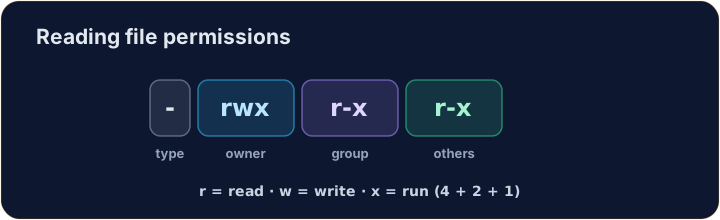
- The ten characters are: type, then owner, group, others:
r= read,w= write,x= execute,-= not allowed. So the owner here can do everything; others can read and run.
日本語
フラグを読む
- 10文字は以下の通り:タイプ、次に 所有者、グループ、その他:
-  rwx  r-x  r-x
file owner group others
r= 読める、w= 書ける、x= 実行可能、-= 不可。つまり所有者はこの環境で全てができ、他者は読めて実行できます。
English
Changing permissions
chmodchanges the mode. Numbers are a quick way:r=4, w=2, x=1, added per group:
7= 4+2+1 (rwx) for the owner;5= 4+1 (r-x) for group and others.755is the classic "runnable program".
日本語
権限を変更する
chmodはchange(変更)とmode(モード)を表します。数字は素早い方法です:r=4, w=2, x=1はグループごとに追加されます。
chmod 755 script.sh
7= 4+2+1 (rwx) は所有者、5= 4+1 (r-x) はグループとその他。755は古典的な「実行可能なプログラム」です。
English
Common mistakes
chmodsets read, write and execute for user, group and others.- You need execute permission to run a script.
日本語
よくあるミス
chmodはユーザー、グループ、その他に対して読める、書ける、実行できるをセットします。- スクリプトを実行するには実行権限が必要です。
Explore · 探索
File permissions (chmod)
Owner / group / others each get rwx — the octal is just those bits.
Make script.sh runnable by giving it permissions 755 with chmod 755 script.sh. The check shows ls -l so you can see the new rwx flags.
secret.key holds a private key, so no one but you should read it. Give it permission 600 with chmod 600 secret.key — owner read+write, group and others nothing.