Wildcards · ワイルドカード
This page needs a recent browser (with SharedArrayBuffer support). Please update Chrome, Edge, Firefox or Safari to the latest version. · このページには最新のブラウザ(SharedArrayBuffer対応)が必要です。Chrome、Edge、Firefox、Safariを最新バージョンに更新してください。
English
One command, many files
- A wildcard is a symbol that stands for "anything". The most common is
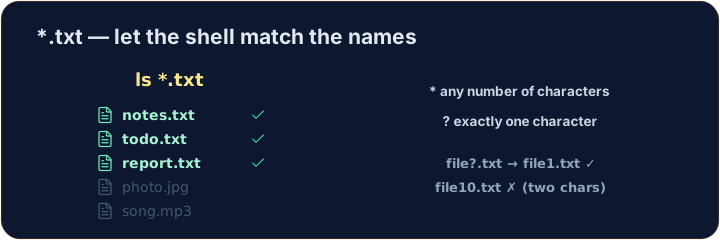
*. *.txtmeans "every name ending in.txt". The shell fills in the matches for you:
日本語
1つのコマンド、多数のファイル
- ワイルドカードとは「何か」を表す記号です。最も一般的なのは
*です。 *.txtは「.txtで終わるすべての名前」を意味します。シェルが一致するものを自動的に埋めてくれます:
ls *.txt
English
The two main wildcards
*matches any number of characters (even none).?matches exactly one character.
- So
file?.txtmatchesfile1.txtandfileA.txt, but notfile10.txt.
日本語
2つの主要なワイルドカード
*は任意の数の文字(ゼロ個も含む)に一致します。?は1文字にのみ一致します。
ls file?.txt
- つまり、
file?.txtはfile1.txtとfileA.txtに一致しますが、file10.txtには一致しません。
English
Be careful with delete
- Wildcards are powerful — and that cuts both ways:
- That deletes every
.txtfile at once. Runls *.txtfirst to see exactly what will go.
日本語
delete には注意
- ワイルドカードは強力ですが、両面性があります:
rm *.txt
- これは すべての
.txtファイルを一度に削除します。実際に何が削除されるかを確認するために、まずls *.txtを実行してください。
English
Common mistakes
*matches any text and?matches one character.- Quote a name that has spaces, or the shell splits it into two.
日本語
よくあるミス
*は任意のテキストに一致し、?は1文字に一致します。- スペースを含む名前は引用符で囲むか、シェルが2つに分割してしまいます。
List only the .txt files using the * wildcard: ls *.txt. · .txt ファイルのみを * ワイルドカードを使ってリスト表示する:ls *.txt 。
Delete all the .txt files at once with rm *.txt. The check lists what is left. · .txt ファイルをすべて rm *.txt で一度に削除する。チェックでは残っているものがリスト表示される。