Reading files · ファイルを読む
This page needs a recent browser (with SharedArrayBuffer support). Please update Chrome, Edge, Firefox or Safari to the latest version. · このページには最新のブラウザ(SharedArrayBuffer対応)が必要です。Chrome、Edge、Firefox、Safariを最新バージョンに更新してください。
English
Reading a file
catprints a file's contents straight to the screen:
- It is named after "concatenate" — it can also join several files together.
日本語
ファイルの読み出し
catはファイルの内容を画面にそのまま印刷します:
cat poem.txt
- "concatenate" にちなんで名付けられ、複数のファイルを結合することもできます。
English
Just the start or end
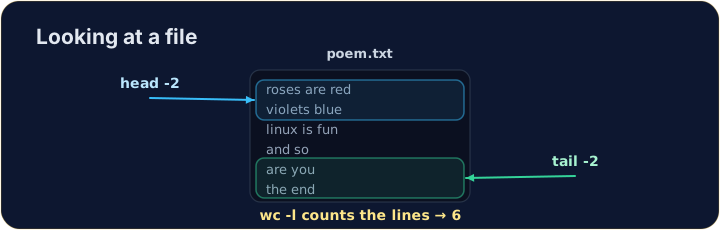
- For a long file you often want only a peek:
headshows the first lines,tailshows the last lines.
- The
-noption chooses how many lines.
日本語
先頭または末尾のみ
- 長いファイルの場合、一部だけを見たいことがあります:
headは先頭の行を表示し、tailは最後の行を表示します。
head -n 2 poem.txt
tail -n 1 poem.txt
-nオプションで表示する行数を選択できます。
English
Counting
wc(word count) measures a file. The most useful option is-lfor lines:
wc -wcounts words andwc -ccounts characters. Now try the tasks.
日本語
カウント
wc(word count)はファイルのサイズを測定します。最も useful なオプションは、行数を計測するための-lです:
wc -l poem.txt
wc -wは単語数をカウントし、wc -cは文字数をカウントします。さあ、タスクを試してください。
English
Common mistakes
catprints a whole file at once; uselessto scroll a large one.- Press Tab to complete a long file name.
日本語
よくあるミス
catはファイル全体を一度に表示しますが、大規模なファイルにはlessを使ってスクロール表示します。- Tab キーを押して長いファイル名を自動補完できます。
Use cat to print the whole contents of poem.txt. · cat を使って poem.txt の全内容を表示する。
How many lines does the poem have? Use wc -l poem.txt to count them. · 詩には何行ありますか? wc -l poem.txt を使って行数を数える。