Colour and links · 色とリンク
This page needs a recent browser (with SharedArrayBuffer support). Please update Chrome, Edge, Firefox or Safari to the latest version. · このページには最新のブラウザ(SharedArrayBuffer対応)が必要です。Chrome、Edge、Firefox、Safariを最新バージョンに更新してください。
English
Adding colour
- The
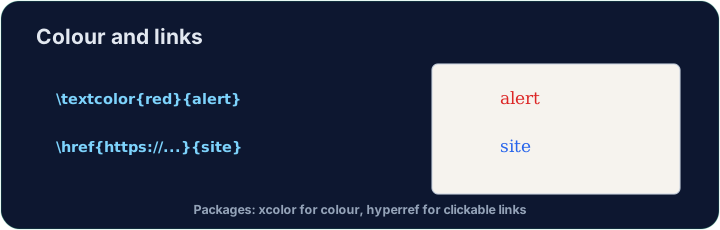
xcolorpackage lets you colour text. Load it, then wrap words:
- Built-in names include
red,blue,green,orange,gray, and more.
日本語
カラーの追加
xcolorパッケージを使用すれば、テキストに色を付けられます。ロードしてから、文字を囲んでください:
\usepackage{xcolor}
...
\textcolor{red}{This is red} and \textcolor{blue}{this is blue}.
- 標準名として、
red、blue、green、orange、grayなどが利用可能です。
English
Highlights and your own colours
\colorbox{yellow}{text}puts a highlight behind the words.- You can even mix your own:
\textcolor{red!60}{...}is 60% red (lighter).
日本語
ハイライトと独自の色
\colorbox{yellow}{text}は文字の背景にハイライト色を適用します。- 独自の色を組み合わせることも可能です:
\textcolor{red!60}{...}は60%の赤(明るい色)です。
English
Clickable links
- The
hyperrefpackage turns cross-references and web addresses into clickable links:
- Load
hyperreflast in your preamble — it likes to have the final word.
日本語
クリック可能なリンク
hyperrefパッケージを使用すれば、内部参照やWebアドレスをクリック可能なリンクに変換できます:
\usepackage{hyperref}
...
Visit \href{https://ctan.org}{CTAN} for packages.
hyperrefはプレアムブル(冒頭部)で最後にロードしてください — 最終的な優先権を持つことを好みます。
English
Common mistakes
- Load
xcolorfor colour andhyperreffor clickable links. - Load
hyperreflast among your packages.
日本語
よくあるミス
- 色付けには
xcolor、クリック可能なリンクにはhyperrefをロードしてください。 hyperrefは他のパッケージの中で最後にロードしてください。
Load xcolor, then make the word warning red with \textcolor{red}{warning}. You need both the package and the command. · xcolor をロードし、次に \textcolor{red}{warning} で単語 warning を赤くします。パッケージとコマンドの両方が必要です。
Click Run to compile and preview the PDF. · コンパイルしてPDFをプレビューするには「実行」をクリックしてください。
Make a clickable link. Load hyperref, then turn the word CTAN into a link with \href{https://ctan.org}{CTAN}. Load hyperref last in the preamble. · クリック可能なリンク を作成します。hyperref をロードし、次に \href{https://ctan.org}{CTAN} で単語 CTAN をリンクに変えます。hyperref は最後に preamble にロードします。
Click Run to compile and preview the PDF. · コンパイルしてPDFをプレビューするには「実行」をクリックしてください。