Labels and cross-references · ラベルとクロスリファレンス
This page needs a recent browser (with SharedArrayBuffer support). Please update Chrome, Edge, Firefox or Safari to the latest version. · このページには最新のブラウザ(SharedArrayBuffer対応)が必要です。Chrome、Edge、Firefox、Safariを最新バージョンに更新してください。
Never write "see Section 3" by hand
- If you write a number by hand and later add a section, every number is wrong.
- LaTeX solves this with labels. Tag something:
\section{Methods}\label{sec:methods}
- The name
sec:methodsis just a nickname you choose.
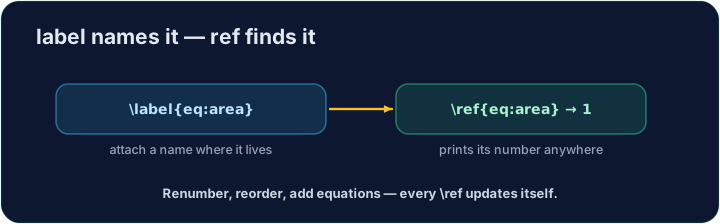
Refer to it anywhere
- Then point at it with
\ref— LaTeX inserts the current number:
As shown in Section~\ref{sec:methods}, ...
- The
~is a space that never breaks across lines, so "Section" and its number stay together.
It needs two passes
- On the first compile LaTeX learns the numbers; on the second it fills them in.
- Our Run does this for you automatically. (The same trick powers a table of contents.)
Common mistakes
- Put
\label{...}after what you want to name, then refer to it with\ref{...}. - Compile twice so cross-references settle to the right numbers.
Label the Methods section with \label{sec:methods}, then refer to it from the last line with \ref{sec:methods}. LaTeX fills in the correct number for you. · 「Methods」セクションに \label{sec:methods} を付与し、最終行で \ref{sec:methods} を用いて参照してください。LaTeX が正しい番号を自動で埋め込みます。
Click Run to compile and preview the PDF. · コンパイルしてPDFをプレビューするには「実行」をクリックしてください。
The same numbering machinery builds a table of contents. Add \tableofcontents as the first line of the body — LaTeX lists every section automatically. · 同じ numbering メカニズムにより 目次 が生成されます。本文の先頭に \tableofcontents を追加すると、LaTeX はすべてのセクションを自動的にリストアップします。
Click Run to compile and preview the PDF. · コンパイルしてPDFをプレビューするには「実行」をクリックしてください。