Drawing with TikZ · TikZによる描画
This page needs a recent browser (with SharedArrayBuffer support). Please update Chrome, Edge, Firefox or Safari to the latest version. · このページには最新のブラウザ(SharedArrayBuffer対応)が必要です。Chrome、Edge、Firefox、Safariを最新バージョンに更新してください。
English
Drawing inside LaTeX
- You can draw diagrams with code using the TikZ package — no image files needed.
- Load it once, then draw inside a
tikzpicture:
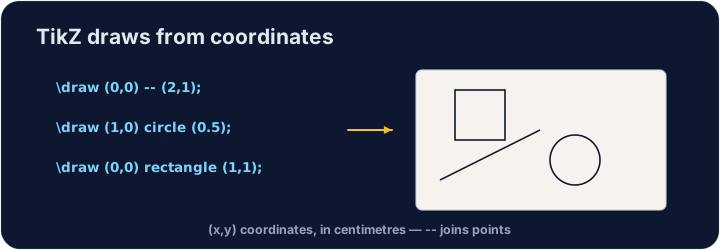
\draw (0,0) -- (2,1);draws a line from one point to another. Every command ends with;.
日本語
LaTeX内での描画
- TikZ パッケージを使用してコードで図を描画できます。画像ファイルは不要です。
- 一度読み込んだ後、
tikzpicture内で描画します:
\usepackage{tikz}
...
\begin{tikzpicture}
  \draw (0,0) -- (2,1);
\end{tikzpicture}
\draw (0,0) -- (2,1);はある点から別の点への線を描きます。すべてのコマンドは;で終わります。
English
Shapes and paths
- Chain points with
--to make any shape;cyclereturns to the start:
日本語
形状とパス
--で点を連結して任意の形状を作り、cycleで始点に戻ります:
\draw (0,0) -- (2,0) -- (1,1.5) -- cycle;   % a triangle
\draw (0,0) circle (1);                      % a circle, radius 1
\draw (0,0) rectangle (3,2);                 % a box
English
Why code a drawing?
- It stays sharp at any size (it is vector graphics, not a photo).
- It is exact — perfect for geometry, graphs, and circuit diagrams.
- Now draw your own triangle in the task.
日本語
なぜコードで描画するのか?
- いかなるサイズでもシャープに保たれます(ベクターグラフィックであり写真ではないため)。
- 正確です。幾何学、グラフ、回路図に最適です。
- タスクでご自身の三角形を描いてみてください。
English
Common mistakes
- Every
\drawcommand ends with a semicolon;. - Wrap the drawing in a
tikzpictureenvironment.
日本語
よくあるミス
- すべての
\drawコマンドは半角セミコロン;で終わります。 - 描画を
tikzpictureエンvironmentで囲みます。
Inside the tikzpicture, \draw a triangle: connect the points (0,0), (3,0) and (1.5,2) and close it with cycle. The tikz package is loaded for you. · tikzpictureの中で、三角形\drawを描画してください。点(0,0)、(3,0)、(1.5,2)を結んでcycleで閉じます。tikzパッケージは読み込まれています。
Click Run to compile and preview the PDF. · コンパイルしてPDFをプレビューするには「実行」をクリックしてください。
Draw two shapes this time. Add a circle of radius 1 with \draw (0,0) circle (1); and a rectangle with \draw (2,-1) rectangle (4,1);. · 今回は2つの形状を描画します。半径1のcircleを\draw (0,0) circle (1);で、rectangleを\draw (2,-1) rectangle (4,1);で追加してください。
Click Run to compile and preview the PDF. · コンパイルしてPDFをプレビューするには「実行」をクリックしてください。