Aligning equations
This page needs a recent browser (with SharedArrayBuffer support). Please update Chrome, Edge, Firefox or Safari to the latest version. · このページには最新のブラウザ(SharedArrayBuffer対応)が必要です。Chrome、Edge、Firefox、Safariを最新バージョンに更新してください。
English
Lining equations up
- When you show working, readers like the
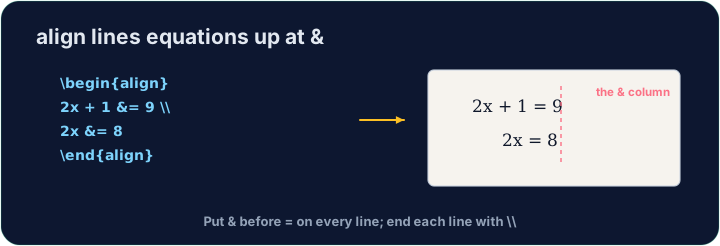
=signs to line up. Thealign*environment does this:
- The
&marks where to align (just before each=), and\\ends each line.
日本語
数式の整列
- 計算過程を示す際、読者は
=の記号が揃っていると見やすくなります。align*エンビロンメントはこれを自動で行います。
\begin{align*}
  y &= 2(x + 3) \\
  y &= 2x + 6
\end{align*}
&は整列地点(各=の直前)を示し、\\は各行の終端を示します。
English
Numbered or not
align*(with the star) gives no equation numbers.- Drop the star —
align— and LaTeX numbers each line(1),(2), … for you to refer to.
日本語
番号あり・なし
align*(星印付き)では数式番号を出力しません。- 星印を外して
alignとすると、LaTeXは参照用として各行に(1)、(2)…という番号を振ります。
English
Matrices
amsmathalso gives matrices.bmatrixdraws square brackets:
- Again
&separates columns and\\separates rows — the same idea as alignment.
日本語
行列
amsmathは行列も生成します。bmatrixは角括弧を描画します:
\[
  \begin{bmatrix} 1 & 2 \\ 3 & 4 \end{bmatrix}
\]
- 先ほどと同様に、
&が列を、\\が行を区切ります(整列と同じ概念)。
English
Common mistakes
- In
align, line up on&and end each line with\\. - Use
align*when you do not want equation numbers.
日本語
よくあるミス
align内で&で整列し、各行を\\で終了させます。- 数式番号が必要ない場合に
align*を使用します。
Show the two steps lined up at the = sign. Put them in an align* environment, with & just before each = and \\ between the lines.
Click Run to compile and preview the PDF. · コンパイルしてPDFをプレビューするには「実行」をクリックしてください。
Draw a 2×2 matrix with bmatrix (square brackets). Separate columns with & and rows with \\, e.g. \begin{bmatrix} 1 & 2 \\ 3 & 4 \end{bmatrix}.
Click Run to compile and preview the PDF. · コンパイルしてPDFをプレビューするには「実行」をクリックしてください。