Maths — your first formula · 数学 — 最初の数式
This page needs a recent browser (with SharedArrayBuffer support). Please update Chrome, Edge, Firefox or Safari to the latest version. · このページには最新のブラウザ(SharedArrayBuffer対応)が必要です。Chrome、Edge、Firefox、Safariを最新バージョンに更新してください。
English
Maths mode
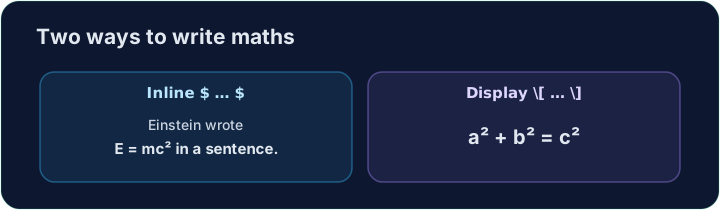
- This is what LaTeX is famous for. To write maths, switch into maths mode with dollar signs:
- Text between
$ ... $is typeset as maths, right inside your sentence. This is inline maths.
日本語
マスモード
- これはLaTeXが名高い機能です。数式を書くには、ドル記号を使ってマスモードに切り替えます:
The equation $E = mc^2$ changed physics.
$ ... $で囲まれたテキストは数式として表示され、文章の真ん中に配置されます。これをインライン数式といいます。
English
Powers and indices
^raises a superscript (a power);_lowers a subscript:
- For more than one character, group them with braces:
$x^{10}$,$a_{i+1}$.
日本語
累乗と添字
^で上付文字(累乗)を、_で下付文字(添字)を作ります:
$x^2$, $a_1$, and $x^2 + y^2 = r^2$
- 複数の文字を指定する場合は、波括弧でグループ化します:
$x^{10}$、$a_{i+1}$。
English
Big, centred equations
- For an important equation on its own line, use display maths
\[ ... \]:
- Now write your own inline formula in the task below.
日本語
大きく中央揃えの数式
- 独立した行に重要な数式を表示するには、ディスペイ数式
\[ ... \]を使用します:
\[ a^2 + b^2 = c^2 \]
- 以下のタスクで、ご自身のインライン数式を書いてみてください。
English
Common mistakes
- Inline maths goes in
$...$; a missing closing$breaks everything after it. - Display maths uses
\[ ... \].
日本語
よくあるミス
- インライン数式は
$...$で囲みます。閉じの$がないと、それ以降のすべてが破損します。 - ディスペイ数式は
\[ ... \]を使用します。
Replace the words with real maths. Write the area of a circle as an inline formula: $A = \pi r^2$. The $ ... $ turns on maths mode, \pi is π, and ^2 is the power. · 単語を実際の数式に置き換えます。円の面積をインライン数式として記述してください:$A = \pi r^2$。$ ... $が数モードをオンにし、\piはπ、^2は指数です。
Click Run to compile and preview the PDF. · コンパイルしてPDFをプレビューするには「実行」をクリックしてください。
For an important equation, give it its own line with display maths \[ ... \]. Write Pythagoras' theorem: \[ a^2 + b^2 = c^2 \]. · 重要な数式には、display maths\[ ... \]で別行に表示してください。ピタゴラスの定理を記述してください:\[ a^2 + b^2 = c^2 \]。
Click Run to compile and preview the PDF. · コンパイルしてPDFをプレビューするには「実行」をクリックしてください。