Sections and titles · セクションとタイトル
This page needs a recent browser (with SharedArrayBuffer support). Please update Chrome, Edge, Firefox or Safari to the latest version. · このページには最新のブラウザ(SharedArrayBuffer対応)が必要です。Chrome、Edge、Firefox、Safariを最新バージョンに更新してください。
English
Organising with sections
- Real documents are split into sections so readers can follow them.
- The command is simple:
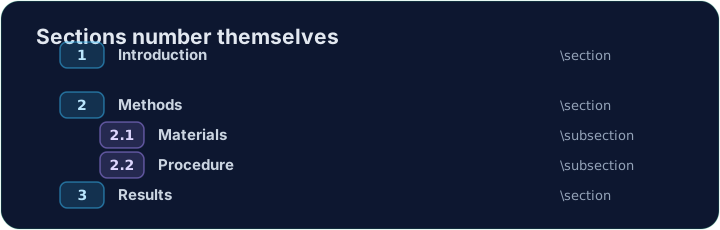
- LaTeX numbers it automatically (1, 2, 3 …) — you never count by hand.
日本語
セクションでの整理
- 実際の文書は、読者が追えるように セクション に分けられます。
- コマンドはシンプルです:
\section{Introduction}
- LaTeXが自動的に番号を振る(1, 2, 3 …)ため、手作業でのカウントは不要です。
English
Smaller pieces
- Inside a section you can add subsections:
- These become 2.1, 2.2, and so on. Add or remove one and everything renumbers itself.
日本語
小見出し
- セクション内には サブセクション を追加できます:
\section{Methods}
\subsection{Materials}
\subsection{Procedure}
- これらは 2.1、2.2 などとなります。一つ追加・削除すれば、すべてが自動で再番号付けされます。
English
A title block
- A report usually starts with a title, an author, and a date.
- You declare them in the preamble, then print them with
\maketitle:
\maketitlemust go inside the body, as its first line.
日本語
タイトルブロック
- レポートは通常、タイトル、著者名、日付で始めます。
- preambleで宣言し、
\maketitleで印刷します:
\documentclass{article}
\title{My First Report}
\author{Pat Lee}
\begin{document}
\maketitle
...
\end{document}
\maketitleは bodyの最初 に置かなければなりません。
English
Common mistakes
\section{...}numbers automatically; use\section*{...}for no number.\maketitleneeds\title{...}and\author{...}set first.
日本語
よくあるミス
\section{...}は自動で番号が振られ、番号なしにする場合は\section*{...}を使います。\maketitleは\title{...}と\author{...}が設定されている必要があります。
Organise this report by adding a section heading. Put \section{Introduction} at the start of the body, then Run. Notice LaTeX numbers it for you. · セクション見出しを追加してこのレポートを整理する。本文の先頭に\section{Introduction}を配置し、Runを実行する。LaTeXが自動的に番号を振ることに注意する。
Click Run to compile and preview the PDF. · コンパイルしてPDFをプレビューするには「実行」をクリックしてください。
Give the document a title block. Add \title{...} and \author{...} in the preamble, then \maketitle as the first line of the body. · 文書にタイトルブロックを与える。プレアムブルに\title{...}と\author{...}を追加し、本文の最初の行に\maketitleを配置する。
Click Run to compile and preview the PDF. · コンパイルしてPDFをプレビューするには「実行」をクリックしてください。