Your first document · 最初のドキュメント
This page needs a recent browser (with SharedArrayBuffer support). Please update Chrome, Edge, Firefox or Safari to the latest version. · このページには最新のブラウザ(SharedArrayBuffer対応)が必要です。Chrome、Edge、Firefox、Safariを最新バージョンに更新してください。
English
Your first LaTeX document
- LaTeX lets you make beautiful documents — reports, books, and especially maths.
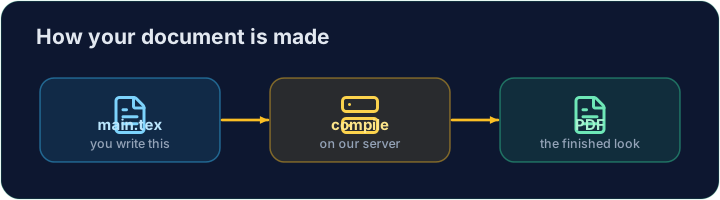
- You write plain text with commands, and the computer turns it into a polished PDF.
- Your LaTeX is compiled on our server — press Run and the PDF appears next to your code.
日本語
あなたの最初のLaTeX文書
- LaTeX を使えば美しい文書(レポート、書籍、特に数学関連)を作れます。
- コマンド付きの plain text を書き、コンピュータがそれを洗練された PDF に変換します。
- LaTeXは当社のサーバーでコンパイルされます — Run を押すと、コードの横にPDFが表示されます。
English
The shape of every document
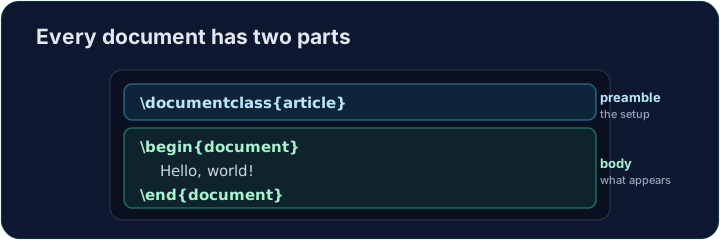
- Every document has two parts — a preamble and a body:
\documentclass{article}is the preamble: it sets the kind of document.- Everything between
\begin{document}and\end{document}is the body — the part that actually appears in the PDF.
日本語
文書の構造
- 文書には2つの部分があります — preamble と body:
\documentclass{article}
\begin{document}
Hello, world!
\end{document}
\documentclass{article}は preamble です — 文書の種類を設定します。\begin{document}と\end{document}の間にあるすべてが body です — PDFに実際に表示される部分です。
English
Now you try
- Below is a document skeleton. Add a greeting in the body.
- Press Run to compile it and see the PDF, then Check when you think it is right.
日本語
あなたも試してみよう
- 以下に文書の骨子を示します。bodyに挨拶を追加してください。
- Run を押してコンパイルしPDFを確認し、正しいと思ったら Check を押してください。
English
Common mistakes
- A document needs
\documentclass{...}and a\begin{document} ... \end{document}. - The text you want to see goes inside the document environment.
日本語
よくあるミス
- 文書には
\documentclass{...}と\begin{document} ... \end{document}が必要です。 - 表示したいテキストは document エンvironmentの内部に入ります。
The skeleton below is a complete LaTeX document. Replace the comment in the body with a greeting (any text containing the word Hello), then click Run to compile it and see the PDF. · 以下の骨子文書は完全なLaTeXドキュメントです。body内のコメントを「Hello」を含む挨拶(任意のテキスト)に置き換えてから、Runをクリックしてコンパイルし、PDFを確認してください。
Click Run to compile and preview the PDF. · コンパイルしてPDFをプレビューするには「実行」をクリックしてください。
Options in square brackets change the whole document. Make the text bigger by adding the [12pt] option: \documentclass[12pt]{article}. Run and see every letter grow. · 角括弧内のオプションで文書全体を変更します。[12pt]オプションを追加して文字を大きくしてください:\documentclass[12pt]{article}。実行するとすべての文字が大きくなります。
Click Run to compile and preview the PDF. · コンパイルしてPDFをプレビューするには「実行」をクリックしてください。