Template literals
This page needs a recent browser (with SharedArrayBuffer support). Please update Chrome, Edge, Firefox or Safari to the latest version. · このページには最新のブラウザ(SharedArrayBuffer対応)が必要です。Chrome、Edge、Firefox、Safariを最新バージョンに更新してください。
English
A cleaner way to build strings
- Wrap a string in backticks
`and you can drop values straight in with${...}. - This is a template literal — much tidier than joining with lots of
+.
日本語
文字列作成のより良い方法
- 文字列をバックティック
`で囲むことで、${...}を使って値をそのまま埋め込めます。 - これはテンプレートリテラルであり、多くの
+でつなぐよりもずっと整理されています。
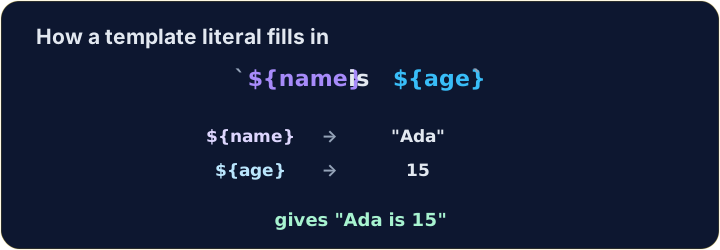
let name = "Ada";
let age = 15;
console.log(`${name} is ${age}`);   // → Ada is 15
English
Any expression fits inside ${ }
- Whatever you write inside
${...}is worked out first, then dropped into the string.
日本語
${ } の中はどんな式でも構わない
${...}の中で書いた式はまず計算され、その後文字列に埋め込まれます。
let a = 3;
let b = 4;
console.log(`${a} + ${b} = ${a + b}`);   // → 3 + 4 = 7
English
Same string, two ways
+and a template literal can build exactly the same text.- In backticks, spaces and punctuation stay where you type them, so a missing space is easy to see.
日本語
同じ文字列、2通りの書き方
+とテンプレートリテラルで全く同じテキストを作成できます。- バックティック内ではスペースや記号は入力したままの位置に残るため、スペースが抜けているのが分かりやすいです。
let item = "pen";
let price = 3;
console.log("A " + item + " costs " + price + " yuan.");   // → A pen costs 3 yuan.
console.log(`A ${item} costs ${price} yuan.`);             // → A pen costs 3 yuan.
English
Watch out
- Backticks
`are not the same as quotes'or".${...}only works inside backticks. - Bonus: a backtick string can span several lines — handy for longer messages.
日本語
注意
- バッククォーテ
`は引用符'や"と同じではありません。${...}はバッククォーテ内でのみ機能します。 - おまけ:バックティック文字列は複数行にもまたがることができ、長いメッセージに適しています。
English
Common mistakes
- Template literals use backticks and
${...}:`Hi ${name}`, not quotes. - Inside
${...}you can put any expression.
日本語
よくあるミス
- テンプレートリテラルはバックティックと
${...}を使います:`Hi ${name}`ではなく、引用符ではありません。 ${...}の中にはどんな式でも入れます。
English
Now you try
- Use backticks and
${...}. - Press Check answer to test it.
日本語
あなたも試してみよう
- バックティックと
${...}を使用します。 - Check answer を押して確認する。
let name = "Sam". Use a template literal (backticks) to log Hello, Sam!.
Click Run to see the output here. · 実行ボタンをクリックして出力を確認してください。
a is 3 and b is 4. Use a template literal to log 3 + 4 = 7 (put a + b inside ${ }).
Click Run to see the output here. · 実行ボタンをクリックして出力を確認してください。
Use a template literal to log Total: 10, working out the 10 as 5 * 2 inside ${ }.
Click Run to see the output here. · 実行ボタンをクリックして出力を確認してください。