テキストファイル
このページには最新のブラウザ(SharedArrayBuffer対応)が必要です。Chrome、Edge、Firefox、Safariを最新バージョンに更新してください。
English
A file keeps data after the program stops
- The 2026–2028 syllabus (section 8.3) stores data in a text file.
- You open the file, read or write one item, then close it.
- This course keeps the file in memory for the one run, so you can see the result.
English
DECLARE Best : STRING
OPENFILE "HighScore.txt" FOR WRITE
WRITEFILE "HighScore.txt", "250"
CLOSEFILE "HighScore.txt"
OPENFILE "HighScore.txt" FOR READ
READFILE "HighScore.txt", Best
CLOSEFILE "HighScore.txt"
OUTPUT "Best so far: ", Best
- The file is opened twice: once
FOR WRITEto store the line, then againFOR READto get it back.
English
READ and WRITE
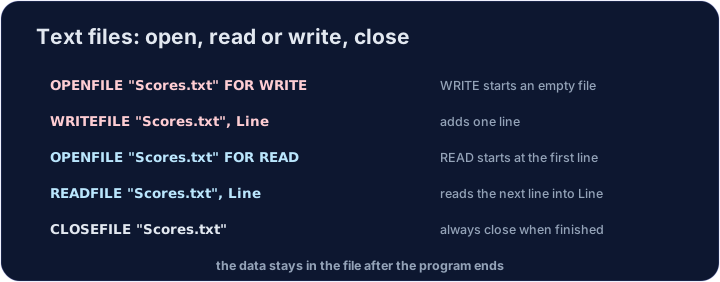
OPENFILE "name.txt" FOR READreads what is already there.OPENFILE "name.txt" FOR WRITEstarts a new file. Anything already in it is lost.READFILEputs the next item into a variable.WRITEFILEstores a value.CLOSEFILEwhen you have finished. A file is open in only one mode at a time.
English
DECLARE Entry : STRING
OPENFILE "Diary.txt" FOR WRITE
WRITEFILE "Diary.txt", "Monday: rain"
CLOSEFILE "Diary.txt"
OPENFILE "Diary.txt" FOR READ
READFILE "Diary.txt", Entry
CLOSEFILE "Diary.txt"
OPENFILE "Backup.txt" FOR WRITE
WRITEFILE "Backup.txt", Entry
CLOSEFILE "Backup.txt"
OUTPUT "Backup holds: ", Entry
- Two files can be used in one program. Each has its own
OPENFILEandCLOSEFILE.
English
Read every line
EOF("List.txt")isTRUEwhen there is no further line to read.WHILE NOT EOF(...)reads the whole file. EachREADFILEputs the next line into aSTRING.- Close the file when you finish. A later open can use it again.
English
DECLARE Entry : STRING
DECLARE Count : INTEGER
OPENFILE "Diary.txt" FOR WRITE
WRITEFILE "Diary.txt", "Monday: rain"
WRITEFILE "Diary.txt", "Tuesday: sun"
WRITEFILE "Diary.txt", "Wednesday: wind"
CLOSEFILE "Diary.txt"
Count ← 0
OPENFILE "Diary.txt" FOR READ
WHILE NOT EOF("Diary.txt") DO
    READFILE "Diary.txt", Entry
    Count ← Count + 1
    OUTPUT Count, ". ", Entry
ENDWHILE
CLOSEFILE "Diary.txt"
OUTPUT Count, " lines read"
| Pass | EOF before the read |
READFILE gets |
Count |
|---|---|---|---|
| 1 | FALSE |
Monday: rain |
1 |
| 2 | FALSE |
Tuesday: sun |
2 |
| 3 | FALSE |
Wednesday: wind |
3 |
| – | TRUE: the loop stops |
– | 3 |
English
Watch out
- Declare the variable before you
READFILEinto it. WRITEreplaces the file. Read it first if you still need the old text.
English
Common mistakes
- Open for
READorWRITE, thenREADFILEorWRITEFILE, thenCLOSEFILE. - The name of the file is a string, in double quotes.
WHILE EOF("List.txt") DOnever starts:EOFisTRUEonly at the end, so you needNOT.- One
READFILEbefore the loop reads only the first line. PutREADFILEinside the loop.
English
Now you try
- The tasks use
Note.txt,FileA.txt,FileB.txtandList.txt. Write, close, open again forREAD, thenOUTPUTwhat you read. - Press Check answer to test it.
難易度 3/5 · 200 コイン + 今日初回達成時の小ボーナス
Hello をNote.txt に書き込み、LineOfText に読み戻して、出力してください。
実行ボタンをクリックして出力を確認してください。
難易度 3/5 · 200 コイン + 今日初回達成時の小ボーナス
Saved をFileA.txt に格納し、LineOfText に読み出して、そのテキストをFileB.txt に書き込み、出力してください。
実行ボタンをクリックして出力を確認してください。
難易度 3/5 · 200 コイン + 今日初回達成時の小ボーナス
Cat とDog をList.txt に書き込み、WHILE NOT EOF で両方の行を出力してください。
実行ボタンをクリックして出力を確認してください。