String handling · 文字列処理
This page needs a recent browser (with SharedArrayBuffer support). Please update Chrome, Edge, Firefox or Safari to the latest version. · このページには最新のブラウザ(SharedArrayBuffer対応)が必要です。Chrome、Edge、Firefox、Safariを最新バージョンに更新してください。
English
LENGTH counts characters
LENGTH(s)gives how many characters are in a string.
日本語
LENGTH(文字数カウント)
LENGTH(s)は文字列に含まれる文字数を返します。
OUTPUT LENGTH("hello") // → 5
English
UCASE and LCASE change case
UCASE(s)makes a string all CAPITALS.LCASE(s)makes it all lower case.
日本語
UCASE と LCASE は大文字・小文字に変換
UCASE(s)は文字列をすべて大文字にします。LCASE(s)は文字列をすべて小文字にします。
OUTPUT UCASE("abc")       // → ABC
OUTPUT LCASE("HeLLo")     // → hello
English
SUBSTRING takes part of a string
SUBSTRING(s, start, length)copies part of a string.- The first character is position 1 (not 0).
日本語
SUBSTRING は文字列の一部を抽出
SUBSTRING(s, start, length)は文字列の一部をコピーします。- 最初の文字は位置 1 です(0ではありません)。
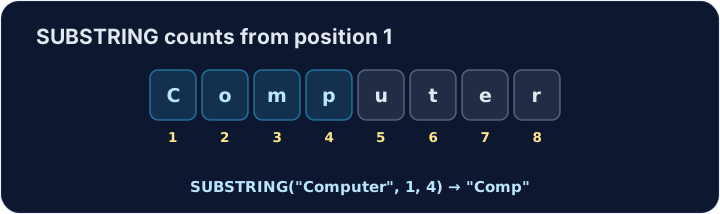
OUTPUT SUBSTRING("Computer", 1, 4) // → Comp
English
Printing several values
OUTPUTtakes several values separated by commas and prints them one after another.- The 0478 pseudocode has no "join" operator — a comma is how you put values side by side.
日本語
複数の値を印刷する
OUTPUTはコンマで区切られた複数の値を受け取り、それらを順番に出力します。- 0478擬似コードには「結合」演算子がありません——コンマで値を並べます。
DECLARE Lives : INTEGER
Lives ← 3
OUTPUT "Cam", "bridge"        // → Cambridge
OUTPUT "You have ", Lives, " lives left"
English
Common mistakes
- Learn the exam's function names:
LENGTH,SUBSTRING,UCASE,LCASE. - String positions in pseudocode often start at
1, not0.
日本語
よくあるミス
- 試験で使われる関数名を学びます:
LENGTH、SUBSTRING、UCASE、LCASE。 - 擬似コードでの文字列の位置は通常
1から始まり、0ではありません。
English
Now you try
- Use the string functions above.
- Press Check answer to test it.
日本語
あなたも試してみよう
- 上記の文字列関数を使用します。
- Check answer を押して確認する。
Read a word, then output how many characters it has with LENGTH. For input hello, output 5. · 単語を入力すると、LENGTH を用いてその文字数を出力します。入力 hello に対しては、出力 5 となります。
Click Run to see the output here. · 実行ボタンをクリックして出力を確認してください。
Read a word and output it in CAPITALS with UCASE. For input cat, output CAT. · 単語を入力すると、UCASE を用いて大文字に変換して出力します。入力 cat に対しては、出力 CAT となります。
Click Run to see the output here. · 実行ボタンをクリックして出力を確認してください。
Read a word and output its first 3 letters with SUBSTRING (start at 1, length 3). For input Computer, output Com. · 単語を入力すると、SUBSTRING を用いて最初の 3 文字を出力します(始位置は 1、長さは 3 です)。入力 Computer に対しては、出力 Com となります。
Click Run to see the output here. · 実行ボタンをクリックして出力を確認してください。