Selection: CASE
This page needs a recent browser (with SharedArrayBuffer support). Please update Chrome, Edge, Firefox or Safari to the latest version. · このページには最新のブラウザ(SharedArrayBuffer対応)が必要です。Chrome、Edge、Firefox、Safariを最新バージョンに更新してください。
CASE chooses among values
CASE OFcompares one variable against several values.- It is tidier than many
IFs when each value gives a fixed result. - The block ends at
ENDCASE.
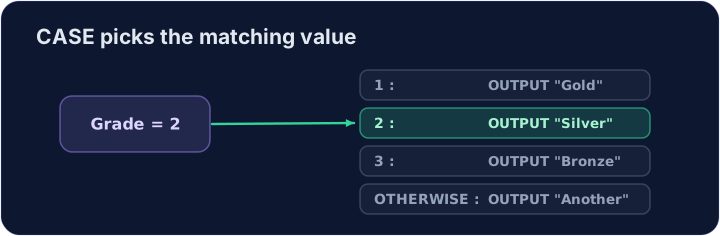
DECLARE Grade : INTEGER
Grade ← 2
CASE OF Grade
    1 : OUTPUT "Gold"
    2 : OUTPUT "Silver"
    3 : OUTPUT "Bronze"
ENDCASE
OTHERWISE catches the rest
OTHERWISEruns when no value matched.- Put it last, just before
ENDCASE.
DECLARE Day : INTEGER
Day ← 1
CASE OF Day
    1 : OUTPUT "Monday"
    2 : OUTPUT "Tuesday"
    OTHERWISE OUTPUT "Another day"
ENDCASE
Watch out
- Each branch is written
value : result. The colon:is required. CASEtests equality with set values — useIFfor ranges likeMark >= 50.
Common mistakes
CASE OF ... OTHERWISE ... ENDCASE;OTHERWISEcatches the rest.- Use CASE when you compare one variable against many values.
Now you try
- Read the input, then choose with
CASE OF ... ENDCASE. - Press Check answer to test it.
Read a Place (an INTEGER). Output Gold for 1, Silver for 2, Bronze for 3, and No medal for anything else. For input 2, output Silver.
Click Run to see the output here. · 実行ボタンをクリックして出力を確認してください。
Read a CHAR G. Output Excellent for A, Good for B, OK for C, and Try again otherwise. For input B, output Good.
Click Run to see the output here. · 実行ボタンをクリックして出力を確認してください。
Read an INTEGER N. Output small for 1, medium for 2, and large for anything else. For input 9, output large.
Click Run to see the output here. · 実行ボタンをクリックして出力を確認してください。