SQL injection · SQLインジェクション
This page needs a recent browser (with SharedArrayBuffer support). Please update Chrome, Edge, Firefox or Safari to the latest version. · このページには最新のブラウザ(SharedArrayBuffer対応)が必要です。Chrome、Edge、Firefox、Safariを最新バージョンに更新してください。
English
When input becomes a command
- Many apps build a database query by gluing the user's input into a string. That is dangerous.
- If an attacker types SQL as their input, it can become part of the query. This is SQL injection — the most famous web attack.
日本語
入力がコマンドになる時
- 多くのアプリは、ユーザーの入力を文字列に貼り付けてデータベースクエリを構築します。これは危険です。
- アタッカーがSQLを入力としてタイプすると、それがクエリの一部になってしまいます。これがSQLインジェクション — 最も有名なウェブ攻撃です。
English
See the attack
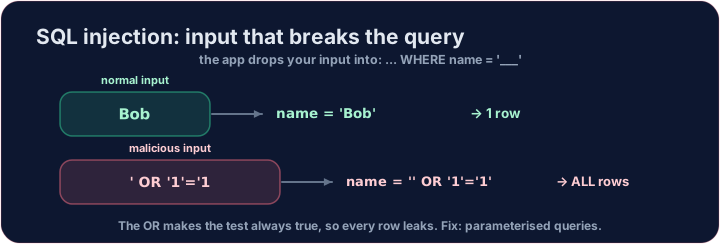
- Imagine a login that checks
... WHERE name = '<whatever you typed>'. - An attacker types
' OR '1'='1as the name. The query becomes:
'1'='1'is always true, so the database returns every user. The login is bypassed. Run it and see.
日本語
攻撃の実際を見る
... WHERE name = '<whatever you typed>'が確認されるログインを想像してみてください。- 攻撃者が名前に
' OR '1'='1を入力します。クエリは次のようになります:
SELECT * FROM users WHERE name = '' OR '1'='1';
'1'='1'は常に真であるため、データベースはすべてのユーザーを返します。ログインがバイパスされます。実行して確認してください。
English
The fix: parameterised queries
- Never glue user input into SQL. Use parameterised queries (also called prepared statements).
- The database treats the input strictly as a value, never as code — so
' OR '1'='1is just a (failed) name to look up. - Also apply least privilege: the web app's database account should only do what it needs.
日本語
修正方法:パラメータ化されたクエリ
- ユーザー入力をSQLに絶対に組み込まないでください。パラメータ化されたクエリ(プレステートメントとも呼ばれる)を使用してください。
- データベースは入力を厳密に値として扱い、コードとして扱わないため、
' OR '1'='1は単に照会対象の(失敗した)名前となります。 - また最小権限も適用してください。Webアプリのデータベースアカウントには必要な操作のみを行わせるようにします。
English
Your turn
- Below, write a precise, safe query that returns only bob by his
id. That is the spirit of a parameterised lookup.
Covers: A-Level data security; web application security.
日本語
実践
- 以下に、
idで bob のみを正確かつ安全に返すクエリを書いてください。これがパラメータ化された照会の精神です。
対象:A-Levelデータセキュリティ;Webアプリケーションセキュリティ。
English
Common mistakes
- Never build a query by joining raw user input into the text.
- Use parameterised queries so input can never change the query.
日本語
よくあるミス
- 生きたユーザー入力をテキストに繋ぎ合わせてクエリを構築しないでください。
- パラメータ化されたクエリを使用することで、入力がクエリを変更することを防げます。
First, run the attack and see the damage. The app glued the attacker's input into the query, so the condition became name = '' OR '1'='1'. Complete the query exactly like that and see every user leak out. · まず攻撃を実行して被害を確認してください。アプリが攻击者の入力をクエリに結合したため、条件がname = '' OR '1'='1'になりました。この通りクエリを正確に完了させ、すべてのユーザー情報が漏洩することを確認してください。
Click Run to see the output here. · 実行ボタンをクリックして出力を確認してください。
A safe lookup uses a precise condition. Change the query to return only bob's row, by adding WHERE id = 2. · 安全な照会使用は正確な条件を使用します。クエリを変えてWHERE id = 2を追加し、ボブの行だけを返すようにしてください。
Click Run to see the output here. · 実行ボタンをクリックして出力を確認してください。