Hashing and digital signatures · ハッシュ化とデジタル署名
This page needs a recent browser (with SharedArrayBuffer support). Please update Chrome, Edge, Firefox or Safari to the latest version. · このページには最新のブラウザ(SharedArrayBuffer対応)が必要です。Chrome、Edge、Firefox、Safariを最新バージョンに更新してください。
English
Hashing protects integrity
- We hashed passwords for secrecy. Hashing also protects integrity — proving data was not changed.
- Change even one character of the input, and the hash changes completely.
日本語
ハッシュによる完全性の保護
- パスワードのハッシュ化は機密性のために用いられます。ハッシュ化はまた完全性も保護し、データが変更されていないことを証明します。
- 入力の文字を1つ変えただけで、ハッシュ値は完全に変わります。
import hashlib
print(hashlib.sha256(b"hello").hexdigest()[:16])
print(hashlib.sha256(b"hellp").hexdigest()[:16])   # totally different
English
Checking a download
- Websites publish the hash of a file. After downloading, you hash your copy and compare.
- If the two hashes match, the file arrived intact. If not, it was corrupted or tampered with.
日本語
ダウンロードの確認
- ウェブサイトはファイルのハッシュ値を公開しています。ダウンロード後、自分のコピーをハッシュ化して比較します。
- 両方のハッシュ値が一致すれば、ファイルは破損なく到着しました。一致しない場合は、破損または改ざんされた可能性があります。
English
Digital signatures
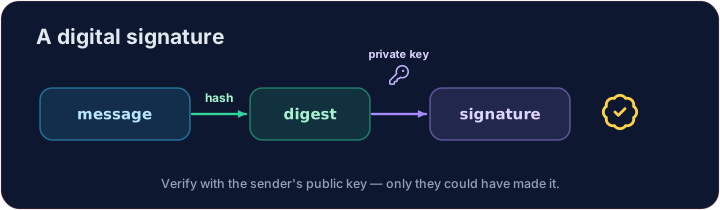
- A digital signature proves who sent something and that it was not changed.
- The sender hashes the message and encrypts that hash with their private key.
- Anyone can check it with the sender's public key — only the real sender could have made it.
日本語
デジタル署名
- デジタル署名は、誰が送ったかそしてそれが変更されていないかを証明します。
- 送信者はメッセージをハッシュ化し、それを自身の秘密鍵で暗号化します。
- 誰でも送信者の公開鍵で確認できますが、実際に作成できたのは真の送信者だけです。
English
Your turn
- Compare the hashes of an original and a received message.
Truemeans the message is intact.
Covers: A-Level 17.1 (digital certification), 6.2 (integrity).
日本語
実践
- 元のメッセージと受信したメッセージのハッシュ値を比較します。
Trueであれば、メッセージは破損なく届いています。
対象: A-Level 17.1 (デジタル証明書), 6.2 (完全性).
English
Common mistakes
- A hash is one-way — you cannot get the original back from it.
- A digital signature proves who sent a message and that it was not changed.
日本語
よくあるミス
- ハッシュは一方向性です。そこから元のデータを取り戻すことはできません。
- デジタル署名は、メッセージの送信者とそれが変更されていないことを証明します。
Explore · 探索
Hashing & signatures · ハッシュ化と署名
A hash is one-way and avalanches — perfect for fingerprints. · ハッシュは一方向性があり、雪崩効果を起こすため、指紋のような用途に最適です。
Check whether a received message is unchanged. Hash both original and received with SHA-256 and print whether the two digests are equal (True or False). · 受信したメッセージが変更されていないか確認してください。SHA-256でoriginalとreceivedをハッシュ化し、printで2つのダイジェストが等しいかどうかを判定してください(TrueまたはFalse)。
Click Run to see the output here. · 実行ボタンをクリックして出力を確認してください。
This time an attacker edited the message in transit. Hash both versions and print TAMPERED if the digests differ, else OK — one changed character is enough to catch. · 今回は攻撃者が通信中にメッセージを編集しました。両方のバージョンをハッシュ化し、ダイジェストが異なる場合はTAMPEREDを、同じ場合はOKを出力してください — 1文字の変更だけで検出できます。
Click Run to see the output here. · 実行ボタンをクリックして出力を確認してください。