Asymmetric encryption · 非対称暗号化
Two keys instead of one
- Symmetric encryption has a problem: you must somehow share the secret key first.
- Asymmetric encryption uses a pair of keys: a public key and a private key.
一つではなく二つの鍵
- 対称暗号化には問題がある:秘密の鍵をまず何らかの形で共有しなければならないのだ。
- 非対称暗号化はペアの鍵を使用する:公開鍵と秘密鍵だ。
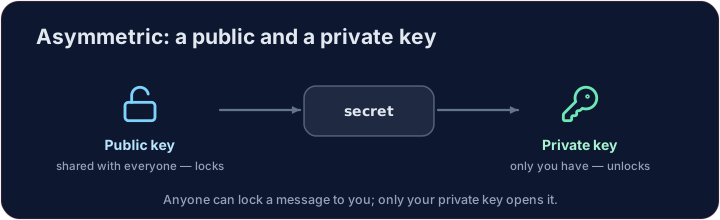
The padlock idea
- Your public key is like an open padlock you hand out to everyone.
- Anyone can lock a message shut with it — but only your private key can open it.
- So people send you secrets safely without ever sharing a secret key. That is the breakthrough.
パッドロックの概念
- あなたの公開鍵は、誰にでも渡せる開いたパッドロックのようなものです。
- 誰でもこれを使ってメッセージをロックできますが、それを開けるのはあなたの秘密鍵だけです。
- つまり、秘密鍵を一度も共有することなく、安全に秘密のメッセージを送り受け取れるのです。これが画期的な点です。
A tiny RSA
- RSA is real asymmetric encryption. With tiny numbers you can see it work:
- Encrypting and decrypting use different keys, yet the message comes back.
小さなRSA
- RSAは本物の非対称暗号です。小さな数字を使えばその仕組みを見ることができます:
n, e, d = 33, 3, 7      # public key (e, n), private key (d, n)
cipher = (7 ** e) % n   # lock 7 with the public key
print((cipher ** d) % n)   # unlock with the private key -> 7
- 暗号化と復号化には異なる鍵を使いますが、メッセージは元に戻ります。
Where you use it daily
- It also works in reverse for digital signatures (next lessons).
- Every time you see HTTPS, asymmetric encryption is quietly setting up a secure connection.
Covers: IGCSE 2.3 (asymmetric, public/private keys), A-Level 17.1, AP CSP.
日常で使われている場所
- デジタル署名(次回のレッスン)では逆に利用されます。
- HTTPSが見られるたびに、非対称暗号が裏側で安全な接続を設定しています。
対象: IGCSE 2.3 (非対称、公開鍵/秘密鍵), A-Level 17.1, AP CSP.
Common mistakes
- A public key encrypts; only the matching private key decrypts.
- Never share the private key.
よくあるミス
- 公開鍵で暗号化され、対応する秘密鍵のみで復号されます。
- 秘密鍵は絶対に共有しないでください。
Public & private keys · 公開鍵と秘密鍵
Anyone encrypts with your public key; only your private key decrypts. · 誰でもあなたの公開鍵で暗号化できますが、解読できるのはあなたの秘密鍵だけです。
Here is a tiny RSA with public key (e, n) and private key (d, n). Encrypt message with the public key (cipher = message**e % n), then decrypt with the private key (plain = cipher**d % n). Print plain — it should return to the original. · ここにある小さなRSAの公開鍵は (e, n) 、秘密鍵は (d, n) です。 message を公開鍵(cipher = message**e % n)で暗号化し、その後秘密鍵(plain = cipher**d % n)で復号します。 plain を印刷してください——元の値に戻っているはずです。
Click Run to see the output here. · 実行ボタンをクリックして出力を確認してください。
The same keys also work in reverse — that is a digital signature. Sign with the private key (sig = message**d % n), then let anyone verify with the public key (sig**e % n). Print whether the verified value equals message. · 同じ鍵は逆方向でも機能します — それがデジタル署名です。秘密鍵(sig = message**d % n)で署名し、誰でも公開鍵(sig**e % n)で検証できます。検証結果がmessageと一致するか確認して出力してください。
Click Run to see the output here. · 実行ボタンをクリックして出力を確認してください。