Defending a system · システムの防御
This page needs a recent browser (with SharedArrayBuffer support). Please update Chrome, Edge, Firefox or Safari to the latest version. · このページには最新のブラウザ(SharedArrayBuffer対応)が必要です。Chrome、Edge、Firefox、Safariを最新バージョンに更新してください。
English
Walls at the edge
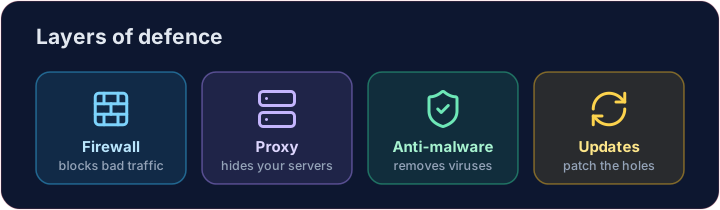
- A firewall sits between your network and the internet, blocking traffic that breaks the rules.
- A proxy server stands in front of your servers, hiding them and filtering requests.
- Together they keep unwanted visitors out before they reach anything important.
日本語
エッジにおける壁
- ファイアウォールはネットワークとインターネットの間に位置し、ルール違反のトラフィックを遮断します。
- プロキシサーバーはサーバーの前に配置され、それを隠蔽し、リクエストをフィルタリングします。
- これらは together で、重要なものへの到達前に不要な訪問者を外に留めます。
English
Software defences
- Anti-malware (anti-virus / anti-spyware) scans for and removes known malware.
- Automatic updates patch weaknesses as soon as fixes are released — most attacks use old, known holes.
日本語
ソフトウェアによる防御
- アンチマルウェア(アンチウイルス / アンチスパイウェア)は既知のマルウェアを検索して除去します。
- 自動アップデートは、修正版が公開され次第脆弱性をパッチします—多くの攻撃は古く知られた穴を利用します。
English
Limiting the damage
- Access levels give each person only the rights they need — a student cannot change a teacher's grades.
- Privacy settings control who can see your data on a service.
- If one account is broken into, good access levels stop the attacker reaching everything.
日本語
被害の限定
- アクセス権限は各ユーザーに必要な最小限の権利のみを与えます—学生が教師の成績を変更することはできません。
- プライバシー設定は、サービス上で谁があなたのデータを見られるかを制御します。
- 1つのアカウントが侵害されても、適切なアクセス権限があれば、アタッカーが全てに到達することを防げます。
English
Smart habits
- Check the URL of a link before clicking, and the spelling and tone of messages.
- Look for HTTPS (the padlock) before entering a password — that is encryption at work, which we'll cover soon.
Covers: IGCSE 5.3 (solutions), A-Level 6.1 (security measures).
日本語
賢明な習慣
- クリックする前にリンクのURLを確認し、メッセージのスペルとトーンをチェックしてください。
- パスワードを入力する前にHTTPS(パッドロック)があるか確認してください。これは暗号化が働いていることを示しており、後ほど詳しく解説します。
対象: IGCSE 5.3 (溶液), A-Level 6.1 (セキュリティ対策).
English
Now you try
- First act as a firewall: let the allowed ports through and collect everything else in a blocked list.
- Then match each threat to the defence that stops it.
日本語
あなたも試してみよう
- まずファイアウォールとして機能し、許可されたポートは通過させ、それ以外のすべてをブロックリストに蓄積します。
- その後、各脅威に対してそれを阻止する防御策を照合します。
English
Common mistakes
- Use layers: firewall, updates, anti-malware and backups.
- No single measure is enough — this is defence in depth.
日本語
よくあるミス
- 層状の防御を用います:ファイアウォール、アップデート、マルウェア除去ソフト、バックアップです。
- 単一の対策では不十分です。これがディフェンス・イン・デプスです。
Act as a firewall. Only ports in allowed may pass. Build a list blocked of every requested port that is not allowed, and print it. · ファイアウォールとして振る舞う。allowedに含まれるポートのみ通過を許可する。要求されたポートの中で許可されていないものをリストblockedとして作成し、それを出力する。
Click Run to see the output here. · 実行ボタンをクリックして出力を確認してください。
Match each problem to the defence that stops it: anti-malware, updates or access levels. · 各問題に対して、それを防ぐ防御策を対応させよ:anti-malware、updates、または access levels。
Click Run to see the output here. · 実行ボタンをクリックして出力を確認してください。