Insert, delete, split and sort
A list that grows and shrinks
- Paper 2 often stores a list in an array that is bigger than the data:
Scores : ARRAY[1:6]with only 4 cells used. - A second variable,
Count, says how many cells hold data. Cells afterCountare spare. - Adding or removing an item means moving other items and changing
Count. This lesson shows four jobs the papers ask for.
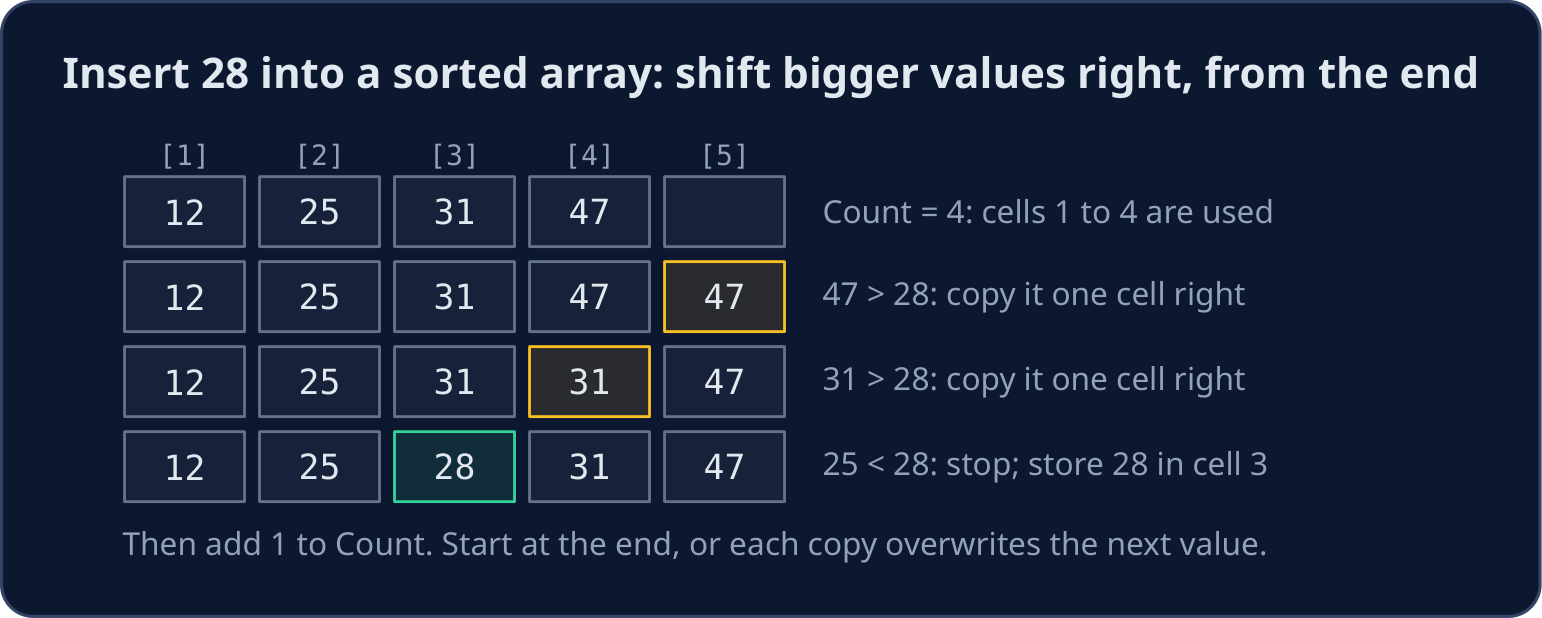
Insert into a sorted array
- Start at the last used cell and move left. Each value bigger than the new one is copied one cell to the right.
- Stop at the first value that is not bigger. The new value goes in the cell just after it.
- Work from the end: if you started at the front, each copy would overwrite the next value before it moved.
- Check first that the array is not full (
Count < 6).
DECLARE Scores : ARRAY[1:6] OF INTEGER
DECLARE Count, NewScore, Index, I : INTEGER
DECLARE Placed : BOOLEAN
Scores[1] ← 12
Scores[2] ← 25
Scores[3] ← 31
Scores[4] ← 47
Count ← 4
NewScore ← 28
Index ← Count
Placed ← FALSE
WHILE Index >= 1 AND NOT Placed
    IF Scores[Index] > NewScore THEN
        Scores[Index + 1] ← Scores[Index]
        Index ← Index - 1
    ELSE
        Placed ← TRUE
    ENDIF
ENDWHILE
Scores[Index + 1] ← NewScore
Count ← Count + 1
FOR I ← 1 TO Count
    OUTPUT Scores[I]
NEXT I
- The output is
12 25 28 31 47, one per line. The flagPlacedstops the loop without readingScores[0], which does not exist.
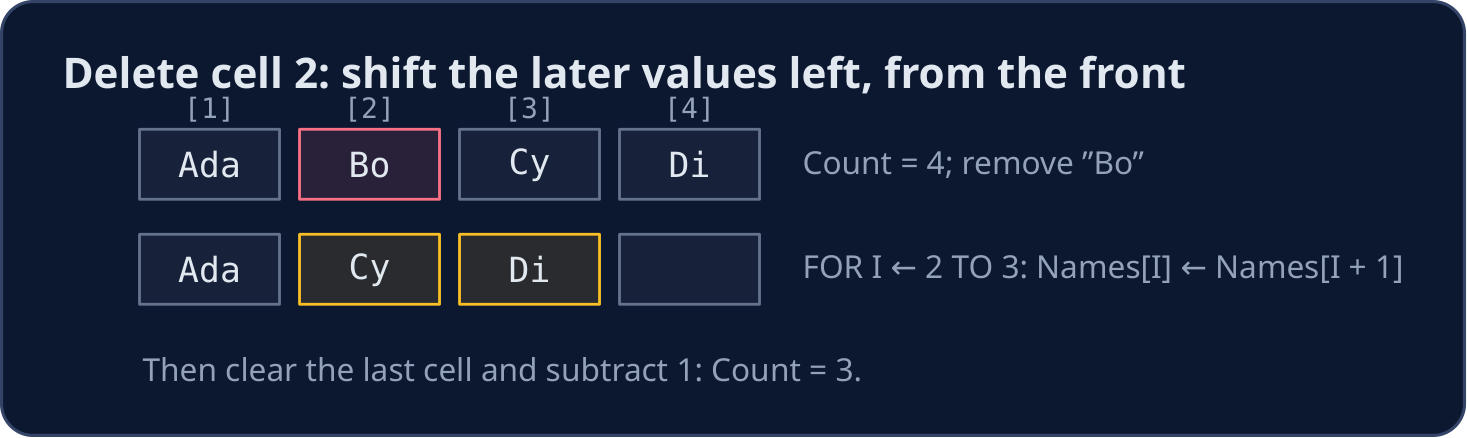
Delete an item
- To delete the item in cell
Position, copy each later value one cell to the left. Work from the front this time. - Then clear the last used cell and subtract 1 from
Count.
DECLARE Names : ARRAY[1:5] OF STRING
DECLARE Count, Position, I : INTEGER
Names[1] ← "Ada"
Names[2] ← "Bo"
Names[3] ← "Cy"
Names[4] ← "Di"
Count ← 4
Position ← 2
FOR I ← Position TO Count - 1
    Names[I] ← Names[I + 1]
NEXT I
Names[Count] ← ""
Count ← Count - 1
FOR I ← 1 TO Count
    OUTPUT Names[I]
NEXT I
- The output is
Ada,Cy,Di.
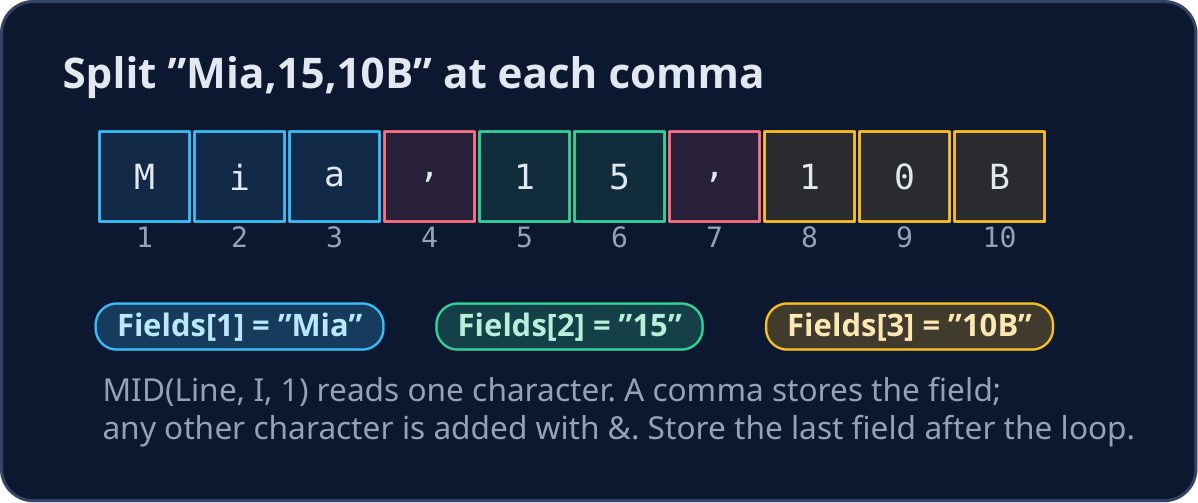
Split a line at its commas
- A file line often holds several fields:
"Mia,15,10B". Your answer may need each part on its own. - Read the line one character at a time with
MID(Line, I, 1). Add each character toFieldwith&. - At a comma, store
Fieldand start a new, empty one. After the loop, store the last field: no comma follows it.
DECLARE Line, Field, Letter : STRING
DECLARE Fields : ARRAY[1:3] OF STRING
DECLARE I, FieldNumber : INTEGER
Line ← "Mia,15,10B"
FieldNumber ← 1
Field ← ""
FOR I ← 1 TO LENGTH(Line)
    Letter ← MID(Line, I, 1)
    IF Letter = "," THEN
        Fields[FieldNumber] ← Field
        FieldNumber ← FieldNumber + 1
        Field ← ""
    ELSE
        Field ← Field & Letter
    ENDIF
NEXT I
Fields[FieldNumber] ← Field
OUTPUT "Name: ", Fields[1]
OUTPUT "Age: ", Fields[2]
OUTPUT "Form: ", Fields[3]
- A field read from a file is a
STRING. UseSTR_TO_NUM(Fields[2])before you calculate with the age.
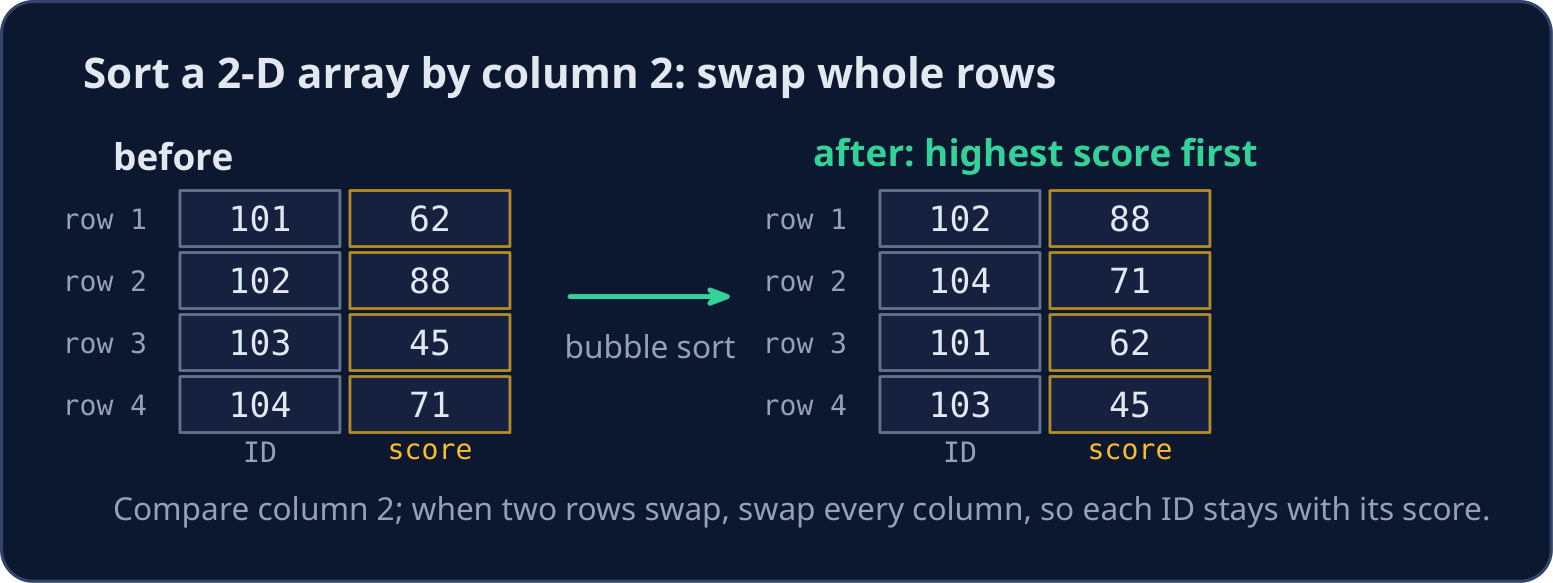
Sort a 2-D array by one column
- Each row of
Resultsis one student: column 1 is the ID and column 2 is the score. - Bubble sort compares column 2 of neighbouring rows. When they are in the wrong order, swap every column of the two rows, so each ID stays with its score.
- Here
<puts the highest score first (descending order).
DECLARE Results : ARRAY[1:4, 1:2] OF INTEGER
DECLARE Pass, Row, Column, Temp : INTEGER
Results[1, 1] ← 101
Results[1, 2] ← 62
Results[2, 1] ← 102
Results[2, 2] ← 88
Results[3, 1] ← 103
Results[3, 2] ← 45
Results[4, 1] ← 104
Results[4, 2] ← 71
FOR Pass ← 1 TO 3
    FOR Row ← 1 TO 3
        IF Results[Row, 2] < Results[Row + 1, 2] THEN
            FOR Column ← 1 TO 2
                Temp ← Results[Row, Column]
                Results[Row, Column] ← Results[Row + 1, Column]
                Results[Row + 1, Column] ← Temp
            NEXT Column
        ENDIF
    NEXT Row
NEXT Pass
FOR Row ← 1 TO 4
    OUTPUT Results[Row, 1], " ", Results[Row, 2]
NEXT Row
Common mistakes
| Wrong | Right | Why |
|---|---|---|
| insert by shifting from the front | shift from the last used cell | moving forwards overwrites the values before they move |
forget to change Count |
add 1 after an insert, subtract 1 after a delete | Count decides which cells the program reads |
WHILE Index >= 1 AND Scores[Index] > NewScore |
use a flag such as Placed |
the second test reads Scores[0] when Index reaches 0 |
| forget the field after the last comma | store Field once more after the loop |
the last field has no comma after it |
| swap only column 2 | swap every column of the two rows | otherwise the IDs and scores get mixed up |
Now you try
- Draw the array before and after on paper. Write
Countafter each change.
Independent transfer
The final task splits lines and keeps a count. Plan the fields, then solve it before opening support. Check a line with only one field.
難易度 2/5 · 140 コイン + 今日初回達成時の小ボーナス
Marks holds 7, 3, 9, 5 and Count is 4. Delete the item in cell 1 by shifting the others left, subtract 1 from Count, then output the items that are left, one per line.
実行ボタンをクリックして出力を確認してください。
難易度 3/5 · 200 コイン + 今日初回達成時の小ボーナス
Values holds 10, 30, 40 (Count is 3). Insert NewValue (20) so the array stays in ascending order, then output every value, one per line.
実行ボタンをクリックして出力を確認してください。
難易度 3/5 · 200 コイン + 今日初回達成時の小ボーナス
Line 保持する "red;green;blue". Output each field between the semicolons, one per line.
実行ボタンをクリックして出力を確認してください。
難易度 4/5 · 280 コイン + 今日初回達成時の小ボーナス
Read one line of text. Output how many comma-separated fields it has. A line with no comma has 1 field, and two commas side by side still count an empty field between them.
実行ボタンをクリックして出力を確認してください。