Selection: CASE
This page needs a recent browser (with SharedArrayBuffer support). Please update Chrome, Edge, Firefox or Safari to the latest version. · このページには最新のブラウザ(SharedArrayBuffer対応)が必要です。Chrome、Edge、Firefox、Safariを最新バージョンに更新してください。
English
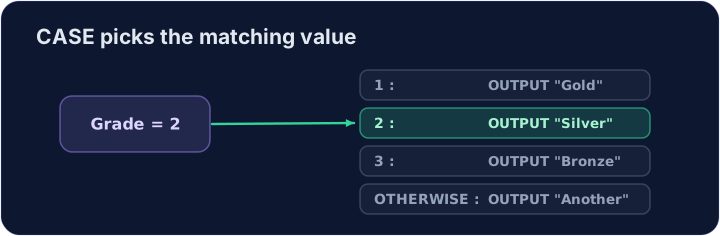
CASE OF picks one branch
- A
CASEruns the branch whose value matches the variable. - Branches are tested in order. The first match runs, and the rest are skipped.
OTHERWISEis the branch for every other value. It comes last.
日本語
CASE OF は1つの分岐を選択する
CASEは変数の値と一致する分岐を実行します。- 分岐は順序通りにテストされます。最初の一致が実行され、残りはスキップされます。
OTHERWISEはそれ以外のすべての値のための分岐です。最後に置きます。
English
日本語
DECLARE Move : CHAR
Move ← 'W'
CASE OF Move
  'W' : OUTPUT "west"
  'E' : OUTPUT "east"
  OTHERWISE : OUTPUT "other"
ENDCASE
English
Watch out
- A character value uses single quotes:
'W'. - Each branch is one statement here. A longer branch is easier to read as an
IF.
日本語
注意
- 文字列の値には単一引用符を使用します:
'W'。 - ここでは各分岐が1文です。より長い分岐は、
IFとして読む方が見やすい場合があります。
English
Common mistakes
- Close the block with
ENDCASE. - Put a colon after the value, and after
OTHERWISE.
日本語
よくあるミス
ENDCASEでブロックを閉じます。- 値の後にコロンを付け、
OTHERWISEの後にもコロンを付けます。
English
Now you try
- Read a character and choose a word with
CASE OF.
日本語
あなたも試してみよう
- 文字を読み取り、
CASE OFを含む単語を選択する。
Read a CHAR Move. Output west for W, east for E, and other for anything else.
Click Run to see the output here. · 実行ボタンをクリックして出力を確認してください。