Writing a class: fields, constructor, methods · クラス定義:フィールド、コンストラクタ、メソッド
Make your own type
- So far you used classes like
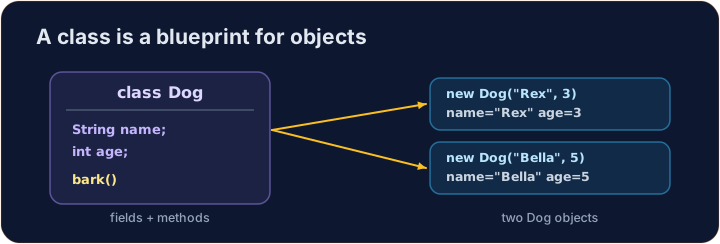
StringandMaththat Java gave you. - Now you will write your own class. A class is a plan for an object.
- An object holds data (its own values) and methods (things it can do).
オリジナルタイプを作成する
- これまでに
StringやMathなど、Javaが用意したクラスを使用してきました。 - 次は独自のクラスを書きます。クラスとはオブジェクトのための設計図です。
- オブジェクトはデータ(自身の値)とメソッド(自身が行えること)を持ちます。
Instance variables
- Data that each object keeps is stored in instance variables (also called fields).
- You declare them inside the class, but outside any method.
- Each object gets its own copy of these variables.
インスタンス変数
- 各オブジェクトが保持するデータはインスタンス変数(フィールドとも呼ばれる)に格納されます。
- クラス内で宣言しますが、どのメソッドの外側で行います。
- 各オブジェクトはこれらの変数の独自のコピーを持ちます。
public class Dog {
    String name;   // instance variable
    int age;       // instance variable
}
A constructor
- A constructor sets up a new object. It runs when you write
new. - It has the same name as the class and no return type (not even
void). - Use the word
thisto mean "this object's own variable".
コンストラクタ
- コンストラクタは新しいオブジェクトを初期化します。
newを記述したときに実行されます。 - クラスと同じ名前を持ち、返り値の型はありません(
voidを含む場合でも)。 - このオブジェクト自身の变量を指すために
thisという言葉を使います。
public class Dog {
    String name;
    int age;

    // Constructor: runs when we make a new Dog
    public Dog(String name, int age) {
        this.name = name;   // this.name is the field; name is the parameter
        this.age = age;
    }
}
Instance methods
- An instance method is an action an object can do.
- It can read and change the object's own instance variables.
- You call it on an object with a dot:
myDog.speak().
インスタンスメソッド
- インスタンスメソッドはオブジェクトが行う動作です。
- オブジェクト自身のインスタンス変数を読み取り、変更できます。
- オブジェクトに対してドットを使って呼び出します:
myDog.speak()。
public class Dog {
    String name;
    int age;

    public Dog(String name, int age) {
        this.name = name;
        this.age = age;
    }

    // Instance method: returns a sentence about this dog
    public String describe() {
        return this.name + " is " + this.age;
    }
}
Make and use an object
- Use
new ClassName(...)to build an object. This calls the constructor. - Store it in a variable whose type is the class name.
- Then call its methods with a dot.
オブジェクトの作成と使用
new ClassName(...)を使ってオブジェクトを作成します。これによりコンストラクタが呼び出されます。- クラス名と同じ型を持つ変数に格納します。
- その後、ドットを使ってそのメソッドを呼び出します。
public class Main {
    public static void main(String[] args) {
        Dog d = new Dog("Rex", 4);
        System.out.println(d.describe());   // Rex is 4
    }
}

class Dog {
    String name;
    int age;

    public Dog(String name, int age) {
        this.name = name;
        this.age = age;
    }

    public String describe() {
        return this.name + " is " + this.age;
    }
}
Why this?
- A parameter and a field can have the same name (like
name). - Inside the constructor,
namemeans the parameter;this.namemeans the field. thisalways means the object the method was called on.
なぜ this なのか?
- パラメータとフィールドは同じ名前を持つことができます(例:
name)。 - コンストラクタ内では、
nameはパラメータを意味し、this.nameはフィールドを意味します。 thisは常にメソッドが呼び出されたオブジェクトを指します。
Common mistakes
- A constructor has no return type and matches the class name.
- Use
this.fieldto tell a field from a parameter of the same name.
よくあるミス
- コンストラクタには戻り値の型がなく、クラス名と一致します。
- 同名のパラメータとフィールドを区別するために
this.fieldを使います。
Now you try
- Each task gives you a class skeleton with a TODO. Fill it in so it compiles and works.
- A hidden Harness builds your object and checks the results.
- Press Run to compile, then Check answer.
あなたも試してみよう
- 各タスクには、TODO が含まれたクラスの骨子が与えられます。コンパイルして動作するように埋めてください。
- 隠された Harness があなたのオブジェクトを作成し、結果をチェックします。
- Run を押してコンパイルし、その後 Check answer を押します。
Complete the Counter class. It has an int field count that starts at 0. increment() adds 1 to it. getCount() returns the current value. · Counter クラスを完成させなさい。int フィールド count を持ち、初期値は 0 です。increment() は 1 を加算します。getCount() は現在の値を返します。
Click Run to see the output here. · 実行ボタンをクリックして出力を確認してください。
Complete the Rectangle class. The constructor takes width w and height h and stores them. area() returns width times height. perimeter() returns 2 times (width plus height). · Rectangle クラスを完成させなさい。コンストラクタは幅 w と高さ h を受け取り、格納します。area() は幅 × 高さを返します。perimeter() は 2 × (幅 + 高さ) を返します。
Click Run to see the output here. · 実行ボタンをクリックして出力を確認してください。
Complete the Greeter class. The constructor takes a String name and stores it in the field name. greet() returns the text Hello, followed by the name and a ! (for "Ana" it returns Hello, Ana!). · Greeter クラスを完成させてください。コンストラクタは String name を受け取り、フィールド name に格納します。greet() はテキスト Hello, に続き、名前と ! を返します("Ana" の場合は Hello, Ana! を返します)。
Click Run to see the output here. · 実行ボタンをクリックして出力を確認してください。