Records in a text file
このページには最新のブラウザ(SharedArrayBuffer対応)が必要です。Chrome、Edge、Firefox、Safariを最新バージョンに更新してください。
English
Records in a text file
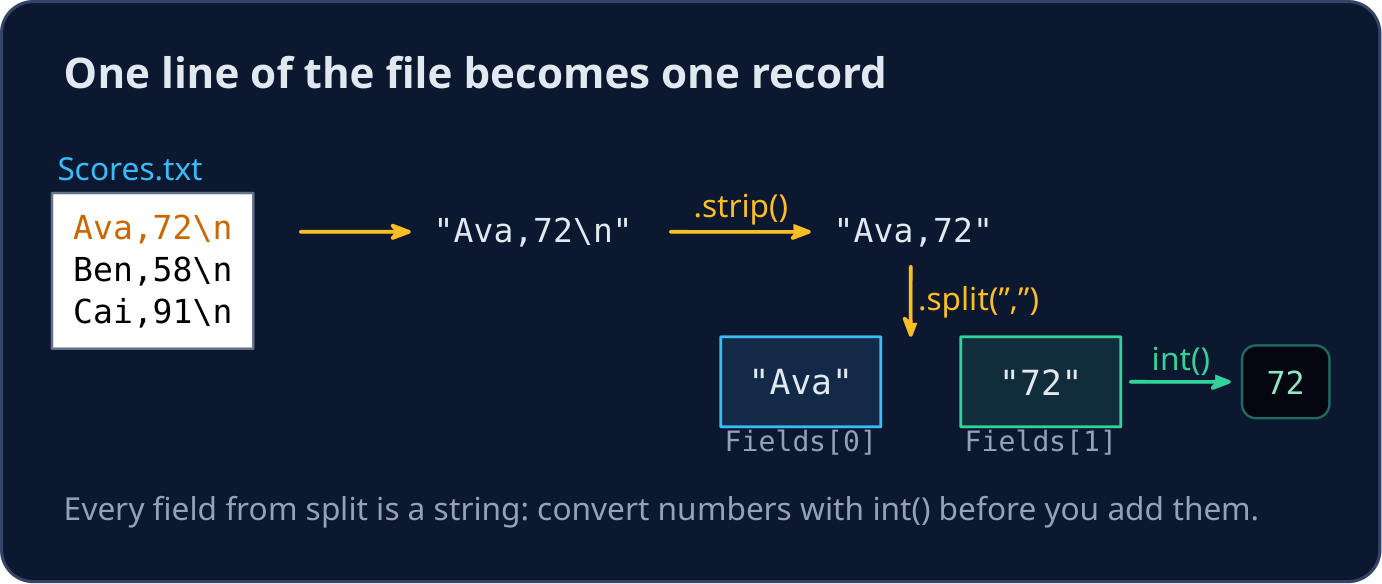
- Paper 4 often gives a text file where each line is one record, with the fields separated by commas:
Ava,72. - The task is usually: read every line, split it into fields, store them in lists (or objects), then process them or write some back.
- Three tools do the work:
.strip()removes the newline,.split(",")cuts the line into fields, andint()turns a number field into a number.
English
Read every line with readline()
with open("Scores.txt", "w") as File:
    File.write("Ava,72\n")
    File.write("Ben,58\n")
    File.write("Cai,91\n")

Names = []
Scores = []
File = open("Scores.txt", "r")
Line = File.readline()
while Line != "":
    Fields = Line.strip().split(",")
    Names.append(Fields[0])
    Scores.append(int(Fields[1]))
    Line = File.readline()
File.close()

print(Names)
print(Scores, "total", sum(Scores))
- The first part only makes the file, so the example can run here. In the exam the file already exists.
readline()returns""at the end of the file, so the loop stops there. Read the next line at the end of the loop body.- Without
.strip(), the last field would be"72\n", andint()would still work, but a name in the last field would keep its newline.
English
Catch a missing file
def ReadScores(FileName):
    Scores = []
    try:
        with open(FileName, "r") as File:
            for Line in File:
                Fields = Line.strip().split(",")
                Scores.append(int(Fields[1]))
    except IOError:
        print("Could not open", FileName)
    return Scores


with open("Scores.txt", "w") as File:
    File.write("Ava,72\nBen,58\nCai,91\n")
print(ReadScores("Scores.txt"))
print(ReadScores("Missing.txt"))
open()raises anIOError(also calledOSError) when the file is missing.try/exceptcatches it, prints a message, and the function still returns a list.for Line in File:is a shorter way to visit every line, and thewithblock closes the file for you.
English
Write records back to a file
Names = ["Ava", "Ben", "Cai"]
Scores = [72, 58, 91]
with open("Passed.txt", "w") as File:
    for Index in range(len(Names)):
        if Scores[Index] >= 60:
            File.write(Names[Index] + "," + str(Scores[Index]) + "\n")

with open("Passed.txt", "r") as File:
    print(File.read())
"w"creates the file, or empties it if it exists."a"adds to the end.write()takes one string: join the fields with+, turn numbers into text withstr(), and add"\n"yourself.
English
Common mistakes
| Wrong | Right | Why |
|---|---|---|
Fields = Line.split(",") on "Ben\n" as the last field |
Line.strip().split(",") |
the newline stays on the last field |
Total = Total + Fields[1] |
Total = Total + int(Fields[1]) |
every field from split is a string |
File.write(Name, Score) |
File.write(Name + "," + str(Score) + "\n") |
write takes one string |
| reading the next line at the start of the loop | read once before the loop and again at the end | otherwise the first line is skipped |
no try around open when the question asks for it |
try / except IOError: |
a missing file would stop the program |
English
Now you try
- Each task makes its own file first. Write the part that reads or writes it.
- Press Check answer to test your code.
難易度 3/5 · 200 コイン + 今日初回達成時の小ボーナス
Stock.txt has one item per line: name,quantity. Write TotalStock(FileName), which returns the sum of all the quantities.
実行ボタンをクリックして出力を確認してください。
難易度 3/5 · 200 コイン + 今日初回達成時の小ボーナス
Write CountLines(FileName), which returns how many lines the file has. If the file cannot be opened, it prints File not found and returns -1.
実行ボタンをクリックして出力を確認してください。
難易度 4/5 · 280 コイン + 今日初回達成時の小ボーナス
Write WriteEmpty(InFile, OutFile). It copies every line of InFile whose quantity is 0 内へ OutFile, in the same name,quantity form, one per line.
実行ボタンをクリックして出力を確認してください。