Mini-project: a profile card · Proyek mini: kartu profil
This page needs a recent browser (with SharedArrayBuffer support). Please update Chrome, Edge, Firefox or Safari to the latest version. · Halaman ini memerlukan browser terbaru (dengan dukungan SharedArrayBuffer). Silakan perbarui Chrome, Edge, Firefox, atau Safari ke versi terbaru.
English
Your mini-project
- Time to put it all together and build a profile card.
- Here is what you are aiming for:
Bahasa Indonesia
Proyek mini Anda
- Saatnya menggabungkan semuanya dan membangun kartu profil.
- Berikut adalah tujuan Anda:
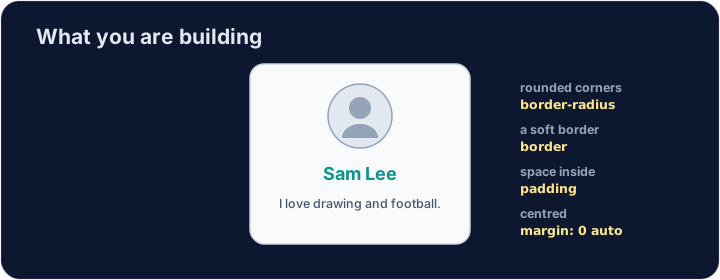
<style>
  .card { width: 280px; margin: 0 auto; padding: 20px; text-align: center;
          background-color: #f8fafc; border: 1px solid #cbd5e1; border-radius: 12px; }
  h2 { color: teal; margin: 8px 0; }
</style>
<div class="card">
  <img src="/static/code/web-basics/cat.svg" alt="My avatar" width="120">
  <h2>Sam Lee</h2>
  <p>I love drawing and football.</p>
</div>
English
What you've learned
- HTML: headings, paragraphs, lists, links, images, tables, forms, page structure.
- CSS: colours, text, the box model, spacing, sizing, and rows with Flexbox.
- That is the real foundation of every web page. You can build things now. 🎉
Bahasa Indonesia
Apa yang telah Anda pelajari
- HTML: heading, paragraf, daftar, tautan, gambar, tabel, formulir, struktur halaman.
- CSS: warna, teks, model kotak, spasi, ukuran, dan baris dengan Flexbox.
- Itu adalah fondasi nyata setiap halaman web. Anda bisa membangun sesuatu sekarang. 🎉
English
Common mistakes
- Build and check one piece at a time.
- Keep the HTML structure and the CSS styling separate.
Bahasa Indonesia
Kesalahan umum
- Bangun dan periksa satu bagian pada saat.
- Jaga struktur HTML dan styling CSS tetap terpisah.
English
Build your card
- The card's layout is already styled, so you can focus on filling it in.
- Each task adds one piece — content, a picture, then colour. Press ▶ often!
Bahasa Indonesia
Bangun kartu Anda
- Tata letak kartu sudah distyling, sehingga Anda dapat fokus mengisi isinya.
- Setiap tugas menambahkan satu bagian — konten, gambar, lalu warna. Tekan ▶ sering kali!
Start your card. Inside the .card, add an <h2> with a name and a <p> with one line about you. · Mulai dengan kartu Anda. Di dalam .card, tambahkan <h2> dengan nama dan <p> dengan satu baris tentang diri Anda.
Add a picture above the name. Add an <img src="/static/code/web-basics/cat.svg"> with alt text, just inside the card. · Tambahkan gambar di atas nama. Tambahkan <img src="/static/code/web-basics/cat.svg"> dengan teks alt, tepat di dalam kartu.
Finish it with a splash of colour. Give the h2 a colour you like, e.g. h2 { color: teal; }. · Selesaikan dengan sentuhan warna. Berikan h2 warna pilihan Anda, mis. h2 { color: teal; }.