Add some style · Tambahkan sedikit gaya
This page needs a recent browser (with SharedArrayBuffer support). Please update Chrome, Edge, Firefox or Safari to the latest version. · Halaman ini memerlukan browser terbaru (dengan dukungan SharedArrayBuffer). Silakan perbarui Chrome, Edge, Firefox, atau Safari ke versi terbaru.
English
Adding style
- HTML gives your page its content. CSS makes it look good.
- The easiest way to add CSS is a
<style>block near the top of your page. - Inside it, you write rules that change how things look.
Bahasa Indonesia
Menambahkan gaya
- HTML memberikan konten halaman Anda. CSS membuatnya terlihat bagus.
- Cara termudah menambahkan CSS adalah blok
<style>di dekat atas halaman Anda. - Di dalamnya, Anda menulis aturan yang mengubah tampilan hal-hal.
English
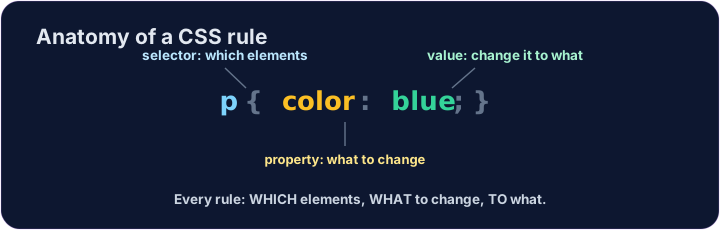
A CSS rule
- A rule has three parts:
p { color: blue; } pis the selector — which tags to change (here, every paragraph).coloris the property — what to change.blueis the value — what to change it to. (Together,color: blue;is one declaration.)
Bahasa Indonesia
Aturan CSS
- Aturan memiliki tiga bagian:
p { color: blue; } padalah selector — tag mana yang akan diubah (di sini, setiap paragraf).coloradalah properti — apa yang harus diubah.blueadalah nilai — apa yang harus diubah menjadi. (Bersama-sama,color: blue;adalah satu deklarasi.)
<style>
  p { color: blue; }
</style>
<p>Now I am blue.</p>
<p>So am I!</p>
English
Common mistakes
- Link the CSS file, or put rules inside a
<style>block. - Each CSS rule ends with a semicolon
;.
Bahasa Indonesia
Kesalahan umum
- Hubungkan file CSS, atau masukkan aturan ke dalam blok
<style>. - Setiap aturan CSS diakhiri dengan titik koma
;.
English
Now you try
- Write your rules inside the
<style>block. - Colour your paragraphs, then your heading.
Bahasa Indonesia
Sekarang Anda coba
- Tulis aturan Anda di dalam blok
<style>. - Warnai paragraf Anda, lalu judul Anda.
Make every paragraph blue. Inside the <style> block, add the rule p { color: blue; }. · Jadikan setiap perenggan biru. Di dalam blok <style>, tambah peraturan p { color: blue; }.
Now colour the heading too. Add a rule h1 { color: red; }. · Sekarang warnai tajuk juga. Tambahkan peraturan h1 { color: red; }.