Tables · Tabel
This page needs a recent browser (with SharedArrayBuffer support). Please update Chrome, Edge, Firefox or Safari to the latest version. · Halaman ini memerlukan browser terbaru (dengan dukungan SharedArrayBuffer). Silakan perbarui Chrome, Edge, Firefox, atau Safari ke versi terbaru.
English
Tables
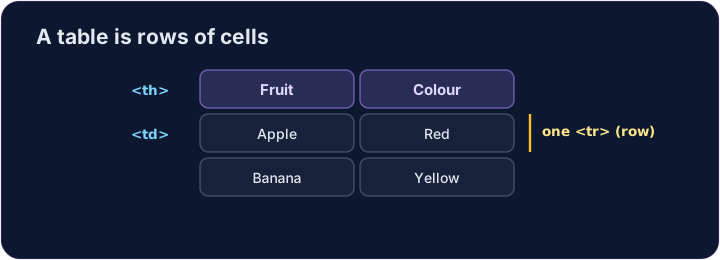
- A table shows information in rows and columns.
- Start with
<table>. - Each row is a
<tr>(table row).
Bahasa Indonesia
Tabel
- Sebuah tabel menampilkan informasi dalam baris dan kolom.
- Mulai dengan
<table>. - Setiap baris adalah
<tr>(baris tabel).
English
Cells
- Inside each row, each cell is a
<td>(table data). - For a heading cell, like a column title, use
<th>— it shows in bold. - Give every row the same number of cells.
Bahasa Indonesia
Sel
- Di dalam setiap baris, setiap sel adalah
<td>(data tabel). - Untuk sel judul, seperti judul kolom, gunakan
<th>— ini akan ditampilkan dengan tebal. - Berikan setiap baris jumlah sel yang sama.
<table>
  <tr><th>Fruit</th><th>Colour</th></tr>
  <tr><td>Apple</td><td>Red</td></tr>
  <tr><td>Banana</td><td>Yellow</td></tr>
</table>
English
Common mistakes
- Cells (
<td>) go inside rows (<tr>). - Use
<th>for header cells.
Bahasa Indonesia
Kesalahan umum
- Sel (
<td>) berada di dalam baris (<tr>). - Gunakan
<th>untuk sel header.
English
Now you try
- A table is rows (
<tr>) holding cells (<td>or<th>). - Build a small table, then add a header cell.
Bahasa Indonesia
Sekarang Anda coba
- Tabel adalah baris (
<tr>) yang menampung sel (<td>atau<th>). - Buatlah tabel kecil, lalu tambahkan sel header.
Make a table with two rows. Each row is a <tr>, and put a <td> cell inside each row. · Buat tabel dengan dua baris. Setiap baris adalah <tr>, dan masukkan satu sel <td> di dalam setiap baris.
Add a header cell so the column has a title. Use <th> instead of <td> for it. · Tambahkan sel header agar kolom memiliki judul. Gunakan <th> daripada <td> untuknya.