This page needs a recent browser (with SharedArrayBuffer support). Please update Chrome, Edge, Firefox or Safari to the latest version. · Halaman ini memerlukan browser terbaru (dengan dukungan SharedArrayBuffer). Silakan perbarui Chrome, Edge, Firefox, atau Safari ke versi terbaru.
English
Links
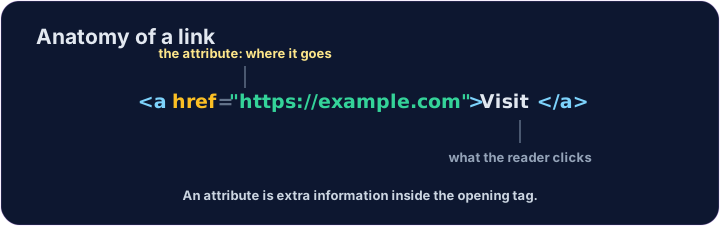
- A link takes you to another page when you click it.
- Use the
<a>tag (astands for anchor). - The web address goes in
href:<a href="...">.
Bahasa Indonesia
Tautan
- Sebuah tautan akan membawa Anda ke halaman lain saat diklik.
- Gunakan tag
<a>(aberarti penanda). - Alamat web diletakkan di dalam
href:<a href="...">.
<a href="https://example.com">Visit Example</a>
English
href is an attribute
href="..."is an attribute — extra information inside the opening tag.- The text between
<a>and</a>is what the reader sees and clicks. - Use the full address, starting with
https://.
Bahasa Indonesia
href adalah atribut
href="..."adalah sebuah atribut — informasi tambahan di dalam tag pembuka.- Teks yang berada antara
<a>dan</a>adalah apa yang dilihat dan diklik oleh pembaca. - Gunakan alamat lengkap, dimulai dengan
https://.
<p>Need facts? <a href="https://wikipedia.org">Look it up</a> now.</p>
English
Common mistakes
- A link needs an
href. - Open a link in a new tab with
target="_blank".
Bahasa Indonesia
Kesalahan umum
- Sebuah tautan memerlukan
href. - Buka tautan di tab baru dengan
target="_blank".
English
Now you try
- A link can stand alone, or sit inside a sentence.
- Build one of each below.
Bahasa Indonesia
Sekarang Anda coba
- Sebuah tautan dapat berdiri sendiri, atau berada di dalam sebuah kalimat.
- Buat satu contoh dari masing-masing di bawah ini.
Add a link to https://example.com with the words Visit Example.
Turn the words look it up into a link to https://wikipedia.org, without breaking the sentence.