Deleting rows · Menghapus baris
Removing rows with DELETE
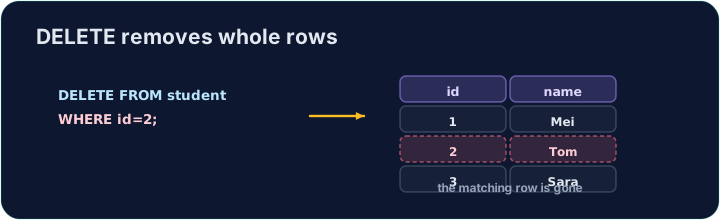
DELETE removes the rows that match a WHERE condition:
Only the matching rows are removed; the table and its other rows stay.
Menghapus baris dengan DELETE
DELETE menghapus baris-baris yang cocok dengan kondisi WHERE:
DELETE FROM product WHERE code = 'P03';
Hanya baris yang cocok yang dihapus; tabel dan baris-baris lainnya tetap ada.
The same warning
Like UPDATE, a DELETE with no WHERE hits every row:
Always check your WHERE before running a DELETE. The checker runs your DELETE, then reads the table back to confirm the right row is gone.
Peringatan yang sama
Seperti UPDATE, sebuah DELETE tanpa WHERE akan mengenai setiap baris:
DELETE FROM product; -- empties the whole table!
Selalu periksa WHERE Anda sebelum menjalankan DELETE. Pengecek menjalankan DELETE Anda, lalu membaca tabel kembali untuk memastikan baris yang benar telah hilang.
Common mistakes
DELETEwithout aWHEREempties the table — always add theWHERE.- Test a risky delete first as a
SELECTwith the sameWHERE.
Kesalahan Umum
DELETEtanpaWHEREakan mengosongkan tabel — selalu tambahkanWHERE.- Uji delete yang berisiko terlebih dahulu sebagai
SELECTdenganWHEREyang sama.
Delete the product with code 'P03' from the product table. (Afterwards only P01 and P02 remain.) · Hapus produk dengan kode 'P03' dari tabel product. (Setelah itu hanya P01 dan P02 yang tersisa.)
Click Run to see the output here. · Klik Jalankan untuk melihat output di sini.
Delete can use any condition. Remove every product that costs less than 2.00 with WHERE price < 2.00. Only the Pen (0.80) goes; check which rows remain. · Delete dapat menggunakan kondisi apa pun. Hapus setiap produk yang harganya kurang dari 2.00 dengan WHERE price < 2.00. Hanya Pen (0.80) yang hilang; periksa baris mana yang tersisa.
Click Run to see the output here. · Klik Jalankan untuk melihat output di sini.