Changing the schema · Mengubah skema
Changing a table's structure
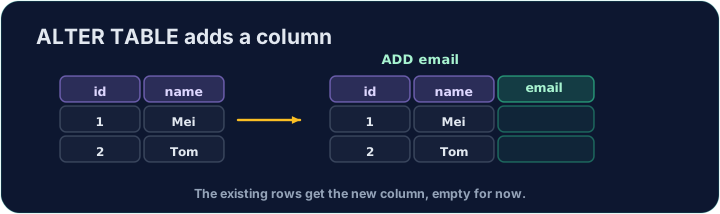
A table's design is not fixed. ALTER TABLE … ADD adds a new column to an existing table:
Existing rows get NULL in the new column until you fill them in.
Mengubah struktur tabel
Desain tabel tidak bersifat tetap. ALTER TABLE … ADD menambahkan kolom baru ke tabel yang sudah ada:
ALTER TABLE product ADD weight DECIMAL(5, 2);
Baris yang sudah ada akan menerima NULL di kolom baru sampai Anda mengisinya.
Removing a table
DROP TABLE deletes a whole table — its structure and all its rows:
This cannot be undone, so use it with care. Dropping a table that other tables reference can break referential integrity.
Menghapus tabel
DROP TABLE menghapus seluruh tabel — strukturnya dan semua barisnya:
DROP TABLE product;
Hal ini tidak dapat dibatalkan, jadi gunakanlah dengan hati-hati. Menghapus tabel yang dirujuk oleh tabel lain dapat merusak integritas referensial.
Common mistakes
ALTER TABLEadds or changes a column.- Existing rows get NULL in a new column unless you set a default.
Kesalahan Umum
ALTER TABLEmenambahkan atau mengubah sebuah kolom.- Baris-baris yang ada akan mendapat NULL di kolom baru kecuali Anda menetapkan nilai default.
Add a new column weight of type DECIMAL(5, 2) to the product table using ALTER TABLE. · Tambahkan kolom baru weight dengan tipe DECIMAL(5, 2) ke tabel product menggunakan ALTER TABLE.
Click Run to see the output here. · Klik Jalankan untuk melihat output di sini.
Delete the entire product table with DROP TABLE. (Afterwards only customer and orders remain.) · Hapus seluruh tabel product dengan DROP TABLE. (Setelah itu hanya customer dan orders yang tersisa.)
Click Run to see the output here. · Klik Jalankan untuk melihat output di sini.