Getting input · Mendapatkan input
Ask the user with input
input()waits for the user to type a line and press Enter.- It gives back what they typed. Store it in a variable.
- Join two strings together with
+.
Meminta pengguna dengan input
input()menunggu pengguna mengetik baris dan menekan Enter.- Ia mengembalikan apa yang mereka ketik. Simpan dalam variabel.
- Gabungkan dua string bersama-sama dengan
+.
name = input()
print("Welcome, " + name)
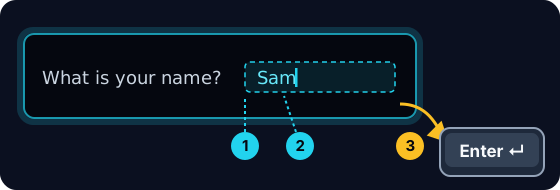
When your program waits
- When you press Run, the program stops at
input()and waits for you. - A highlighted box appears under the code: type here, then press Enter.
- Click the box, type your answer and press Enter. Then the program continues.
Ketika program Anda menunggu
- Saat Anda menekan Jalankan, program berhenti di
input()dan menunggu Anda. - Kotak yang disorot muncul di bawah kode: ketik di sini, lalu tekan Enter.
- Klik kotak tersebut, ketik jawaban Anda dan tekan Enter. Kemudian program akan berlanjut.
input always gives a string
- Whatever the user types comes back as a string.
- Even if they type
5, you get the text"5", not the number. - So
"5" + "5"is"55"(joined text), not10.
input selalu mengembalikan string
- Apa pun yang diketik pengguna akan dikembalikan sebagai string.
- Bahkan jika mereka mengetik
5, Anda mendapatkan teks"5", bukan angkanya. - Jadi
"5" + "5"adalah"55"(teks gabungan), bukan10.
print("5" + "5") # 55 — joined text, not the number 10
Turn text into a number
int(...)turns text into a whole number:int("5")→5.float(...)turns text into a decimal:float("2.5")→2.5.- Convert first, then you can do maths.
Mengubah teks menjadi angka
int(...)mengubah teks menjadi bilangan bulat:int("5")→5.float(...)mengubah teks menjadi desimal:float("2.5")→2.5.- Konversi terlebih dahulu, baru Anda bisa melakukan matematika.
age = int(input())
print(age + 1)
Common mistakes
input()always returns a string, so wrap it inint(...)before doing maths.- The text inside
input("...")is the prompt shown to the user.
Kesalahan umum
input()selalu mengembalikan string, jadi bungkus denganint(...)sebelum melakukan operasi matematika.- Teks di dalam
input("...")adalah prompt yang ditampilkan kepada pengguna.
Now you try
- When you Run, type the input yourself in the box and press Enter.
- Check answer types the task's input for you, so just read it with
input(). - Each task needs only one
input().
Sekarang Anda coba
- Saat Run, ketik input sendiri di kotak dan tekan Enter.
- Check answer mengetikkan input tugas untuk Anda, jadi cukup baca dengan
input(). - Setiap tugas hanya membutuhkan satu
input().
Input → process → output · Input → proses → output
Most programs follow one shape: get input, do something, show output. · Sebagian besar program mengikuti satu bentuk: dapatkan input, lakukan sesuatu, tampilkan output.
Read a name with input(), then print Hi, then the name then !. For the input Sam, the output should be Hi, Sam!. · Baca nama dengan input(), lalu cetak Hi, kemudian nama lalu !. Untuk input Sam, output seharusnya Hi, Sam!.
Click Run to see the output here. · Klik Jalankan untuk melihat output di sini.
Read a whole number with input(), convert it with int(...), then print the number plus 100. For input 7, the output should be 107. · Baca bilangan bulat dengan input(), ubah tipenya dengan int(...), lalu cetak angka ditambah 100. Untuk input 7, output seharusnya adalah 107.
Click Run to see the output here. · Klik Jalankan untuk melihat output di sini.
Read a whole number, convert it with int(...), then print its square (the number times itself). For input 5, the output should be 25. · Baca bilangan bulat, ubah tipenya dengan int(...), lalu cetak kuadratnya (angka dikalikan dirinya sendiri). Untuk input 5, output seharusnya adalah 25.
Click Run to see the output here. · Klik Jalankan untuk melihat output di sini.
Read the width, then the height, each with int(input()). Print the area on one line and the perimeter on the next. For the inputs 3 and 5 the output is Area: 15 and Perimeter: 16. · Baca lebar, kemudian tinggi, masing-masing dengan int(input()). Cetak luas pada satu baris dan keliling pada baris berikutnya. Untuk input 3 dan 5, outputnya adalah Area: 15 dan Perimeter: 16.
Click Run to see the output here. · Klik Jalankan untuk melihat output di sini.