Tables · Tabel
This page needs a recent browser (with SharedArrayBuffer support). Please update Chrome, Edge, Firefox or Safari to the latest version. · Halaman ini memerlukan browser terbaru (dengan dukungan SharedArrayBuffer). Silakan perbarui Chrome, Edge, Firefox, atau Safari ke versi terbaru.
English
Tables
- A table uses the
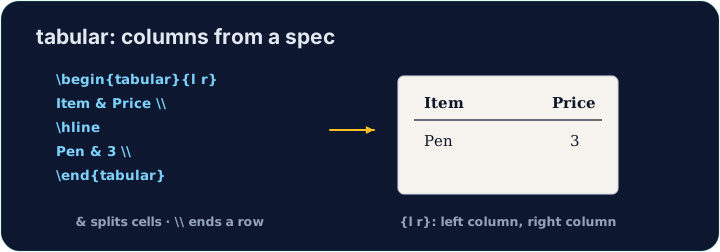
tabularenvironment. You first describe the columns:
{l c r}means three columns: left-aligned, centred, right-aligned.
Bahasa Indonesia
Tabel
- Sebuah tabel menggunakan lingkungan
tabular. Pertama-tama Anda mendeskripsikan kolom:
\begin{tabular}{l c r}
  left & centre & right \\
\end{tabular}
{l c r}berarti tiga kolom: left-aligned (rata kiri), centred (terpusat), right-aligned (rata kanan).
English
Rows and cells
- Inside,
&jumps to the next column and\\starts a new row:
- The number of cells in each row must match the number of columns you declared.
Bahasa Indonesia
Baris dan sel
- Di dalamnya,
&melompat ke kolom berikutnya dan\\memulai baris baru:
\begin{tabular}{l l}
  Apple & 5 \\
  Banana & 3 \\
\end{tabular}
- Jumlah sel dalam setiap baris harus sesuai dengan jumlah kolom yang Anda deklarasikan.
English
Lines (optional)
- Add
|between column letters for vertical lines, and\hlinefor horizontal ones:
- For a cleaner look, professionals use the
booktabspackage instead of many lines.
Bahasa Indonesia
Garis (opsional)
- Tambahkan
|di antara huruf kolom untuk garis vertikal, dan\hlineuntuk garis horizontal:
\begin{tabular}{|l|l|}
  \hline
  Apple & 5 \\ \hline
\end{tabular}
- Untuk tampilan yang lebih bersih, profesional menggunakan paket
booktabsalih-alih banyak garis.
English
Common mistakes
tabularneeds a column spec like{lcr}; separate cells with&and end rows with\\.- The number of
&per row must fit the column spec.
Bahasa Indonesia
Kesalahan umum
tabularmemerlukan spesifikasi kolom seperti{lcr}; pisahkan sel dengan&dan akhiri baris dengan\\.- Jumlah
&per baris harus sesuai dengan spesifikasi kolom.
Build a small two-column table with \begin{tabular}{l l}. Separate the two cells in a row with &, and end each row with \\. Add the rows for Bob (30) and Mei (25). · Bina jadual kecil dua lajur dengan \begin{tabular}{l l}. Pisahkan dua sel dalam satu baris dengan &, dan tamatkan setiap baris dengan \\. Tambah baris untuk Bob (30) dan Mei (25).
Click Run to compile and preview the PDF. · Klik Jalankan untuk mengkompilasi dan pratinjau PDF.
Add lines to the table. Put \hline at the top, after the header row, and at the bottom, and use |l|l| in the column spec for vertical lines. · Tambahkan garis ke tabel. Letakkan \hline di atas, setelah baris header, dan di bawah, dan gunakan |l|l| dalam spesifikasi kolom untuk garis vertikal.
Click Run to compile and preview the PDF. · Klik Jalankan untuk mengkompilasi dan pratinjau PDF.