Sections and titles · Bagian dan judul
This page needs a recent browser (with SharedArrayBuffer support). Please update Chrome, Edge, Firefox or Safari to the latest version. · Halaman ini memerlukan browser terbaru (dengan dukungan SharedArrayBuffer). Silakan perbarui Chrome, Edge, Firefox, atau Safari ke versi terbaru.
English
Organising with sections
- Real documents are split into sections so readers can follow them.
- The command is simple:
- LaTeX numbers it automatically (1, 2, 3 …) — you never count by hand.
Bahasa Indonesia
Mengorganisir dengan bagian
- Dokumen nyata dibagi menjadi bagian agar pembaca dapat mengikutinya.
- Perintahnya sederhana:
\section{Introduction}
- LaTeX memberi nomor secara otomatis (1, 2, 3 …) — Anda tidak pernah menghitung manual.
English
Smaller pieces
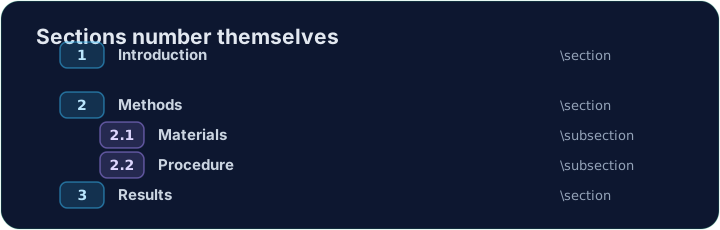
- Inside a section you can add subsections:
- These become 2.1, 2.2, and so on. Add or remove one and everything renumbers itself.
Bahasa Indonesia
Potongan lebih kecil
- Di dalam bagian Anda dapat menambahkan subbagian:
\section{Methods}
\subsection{Materials}
\subsection{Procedure}
- Ini menjadi 2.1, 2.2, dan seterusnya. Tambah atau hapus satu dan semuanya memberi nomor ulang sendiri.
English
A title block
- A report usually starts with a title, an author, and a date.
- You declare them in the preamble, then print them with
\maketitle:
\maketitlemust go inside the body, as its first line.
Bahasa Indonesia
Blok judul
- Laporan biasanya dimulai dengan judul, penulis, dan tanggal.
- Anda mendeklarasikannya di preamble, lalu mencetaknya dengan
\maketitle:
\documentclass{article}
\title{My First Report}
\author{Pat Lee}
\begin{document}
\maketitle
...
\end{document}
\maketitleharus berada di dalam body, sebagai baris pertamanya.
English
Common mistakes
\section{...}numbers automatically; use\section*{...}for no number.\maketitleneeds\title{...}and\author{...}set first.
Bahasa Indonesia
Kesalahan umum
\section{...}diberi nomor secara otomatis; gunakan\section*{...}untuk tanpa nomor.\maketitlememerlukan\title{...}dan\author{...}diatur terlebih dahulu.
Organise this report by adding a section heading. Put \section{Introduction} at the start of the body, then Run. Notice LaTeX numbers it for you. · Atur laporan ini dengan menambahkan judul bagian. Letakkan \section{Introduction} di awal badan, lalu Run. Perhatikan bahwa LaTeX memberinya nomor untuk Anda.
Click Run to compile and preview the PDF. · Klik Jalankan untuk mengkompilasi dan pratinjau PDF.
Give the document a title block. Add \title{...} and \author{...} in the preamble, then \maketitle as the first line of the body. · Berikan dokumen blok judul. Tambahkan \title{...} dan \author{...} di pra-bacaan, lalu \maketitle sebagai baris pertama badan.
Click Run to compile and preview the PDF. · Klik Jalankan untuk mengkompilasi dan pratinjau PDF.