Your first document · Dokumen pertama Anda
This page needs a recent browser (with SharedArrayBuffer support). Please update Chrome, Edge, Firefox or Safari to the latest version. · Halaman ini memerlukan browser terbaru (dengan dukungan SharedArrayBuffer). Silakan perbarui Chrome, Edge, Firefox, atau Safari ke versi terbaru.
English
Your first LaTeX document
- LaTeX lets you make beautiful documents — reports, books, and especially maths.
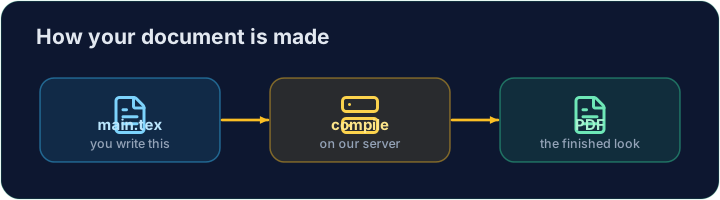
- You write plain text with commands, and the computer turns it into a polished PDF.
- Your LaTeX is compiled on our server — press Run and the PDF appears next to your code.
Bahasa Indonesia
Dokumen LaTeX pertama Anda
- LaTeX memungkinkan Anda membuat dokumen indah — laporan, buku, dan terutama matematika.
- Anda menulis teks biasa dengan perintah, dan komputer mengubahnya menjadi PDF yang rapi.
- LaTeX Anda dikompilasi di server kami — tekan Run dan PDF muncul di samping kode Anda.
English
The shape of every document
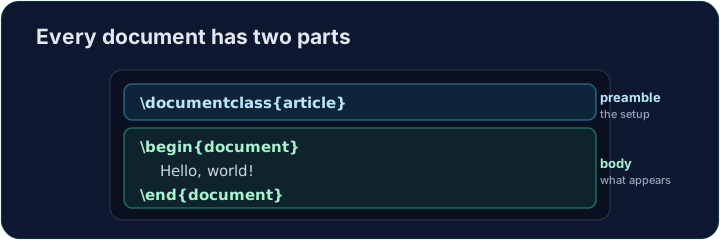
- Every document has two parts — a preamble and a body:
\documentclass{article}is the preamble: it sets the kind of document.- Everything between
\begin{document}and\end{document}is the body — the part that actually appears in the PDF.
Bahasa Indonesia
Bentuk setiap dokumen
- Setiap dokumen memiliki dua bagian — preamble dan body:
\documentclass{article}
\begin{document}
Hello, world!
\end{document}
\documentclass{article}adalah preamble: ia menetapkan jenis dokumen.- Semua antara
\begin{document}dan\end{document}adalah body — bagian yang benar-benar muncul di PDF.
English
Now you try
- Below is a document skeleton. Add a greeting in the body.
- Press Run to compile it and see the PDF, then Check when you think it is right.
Bahasa Indonesia
Sekarang Anda coba
- Di bawah ini adalah kerangka dokumen. Tambahkan sapaan di bagian body.
- Tekan Run untuk mengompilasi dan melihat PDF, lalu Check ketika Anda merasa itu sudah benar.
English
Common mistakes
- A document needs
\documentclass{...}and a\begin{document} ... \end{document}. - The text you want to see goes inside the document environment.
Bahasa Indonesia
Kesalahan umum
- Sebuah dokumen membutuhkan
\documentclass{...}dan sebuah\begin{document} ... \end{document}. - Teks yang ingin Anda lihat masuk ke dalam lingkungan dokumen.
The skeleton below is a complete LaTeX document. Replace the comment in the body with a greeting (any text containing the word Hello), then click Run to compile it and see the PDF. · Rangka di bawah ini adalah dokumen LaTeX lengkap. Ganti komentar di badan dengan salam (teks apa pun yang mengandung kata Hello), lalu klik Run untuk mengompilasinya dan lihat PDF-nya.
Click Run to compile and preview the PDF. · Klik Jalankan untuk mengkompilasi dan pratinjau PDF.
Options in square brackets change the whole document. Make the text bigger by adding the [12pt] option: \documentclass[12pt]{article}. Run and see every letter grow. · Opsi dalam kurung siku mengubah seluruh dokumen. Buat teks lebih besar dengan menambahkan opsi [12pt]: \documentclass[12pt]{article}. Jalankan dan lihat setiap huruf membesar.
Click Run to compile and preview the PDF. · Klik Jalankan untuk mengkompilasi dan pratinjau PDF.