HTTPS, SSL/TLS and certificates · HTTPS, SSL/TLS dan sertifikat
The padlock in your browser
- When you see HTTPS and a padlock, your connection to the website is encrypted.
- The "S" stands for Secure. It uses a protocol called TLS (the modern version of SSL).
Gembok di browser Anda
- Saat Anda melihat HTTPS dan gembok, koneksi Anda ke situs web tersebut terenkripsi.
- "S" berdiri untuk Secure (Aman). Ini menggunakan protokol yang disebut TLS (versi modern dari SSL).
How the secure connection is set up
- TLS cleverly combines both kinds of encryption you have learned:
- It uses asymmetric encryption to safely agree on a shared secret key.
- Then it switches to fast symmetric encryption for the rest of the conversation.
- This "handshake" happens in a fraction of a second, before any page loads.
Bagaimana koneksi aman disetel
- TLS dengan cerdas menggabungkan kedua jenis enkripsi yang telah Anda pelajari:
- Ia menggunakan enkripsi asimetris untuk secara aman menyepakati kunci rahasia bersama.
- Kemudian ia beralih ke enkripsi simetris yang cepat untuk sisa percakapan.
- "Jabat tangan" ini terjadi dalam pecahan detik, sebelum halaman apa pun dimuat.
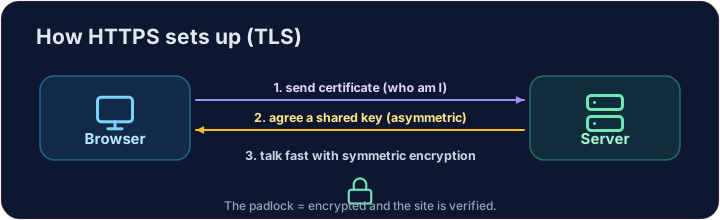
How do you know the site is real?
- Encryption is useless if you are talking to an impostor. That is what digital certificates solve.
- A website's certificate is issued by a trusted Certificate Authority (CA) and signed with the CA's key.
- Your browser checks the signature. If it is valid, you know the site is who it claims to be.
Bagaimana Anda tahu situs itu asli?
- Enkripsi tidak berguna jika Anda berbicara dengan penipu. Itulah yang diselesaikan oleh sertifikat digital.
- Sertifikat sebuah situs web diterbitkan oleh Otoritas Sertifikat (CA) yang tepercaya dan ditandatangani dengan kunci CA.
- Browser Anda memeriksa tanda tangannya. Jika valid, Anda tahu bahwa situs tersebut adalah siapa yang diklaimnya.
Putting it together
- Certificate → proves who the site is. TLS → keeps the conversation secret.
- That tiny padlock means: encrypted, and verified. No padlock on a login page? Walk away.
Covers: IGCSE 5.3 (SSL), A-Level 17.1 (SSL/TLS, digital certificates).
Menggabungkannya
- Sertifikat → membuktikan siapa situs tersebut. TLS → menjaga percakapan tetap rahasia.
- Gembok kecil itu berarti: terenkripsi, dan diverifikasi. Tidak ada gembok di halaman login? Tinggalkan saja.
Cakupan: IGCSE 5.3 (SSL), A-Level 17.1 (SSL/TLS, sertifikat digital).
Now you try
- First put the four handshake steps in the right order — the exam loves this sequence.
- Then be the browser: look at a certificate's details and decide whether to trust it.
Sekarang Anda coba
- Pertama, susun empat langkah jabat tangan dalam urutan yang benar — ujian sangat menyukai urutan ini.
- Kemudian menjadi browser: lihat detail sebuah sertifikat dan putuskan apakah untuk mempercayainya.
Common mistakes
- HTTPS encrypts the traffic; the certificate proves the site's identity.
- A certificate warning is a real warning — do not click through it.
Kesalahan umum
- HTTPS mengenkripsi lalu lintas; sertifikat membuktikan identitas situs.
- Peringatan sertifikat adalah peringatan sungguhan — jangan klik melewatinya.
The TLS handshake · Handshake TLS
HTTPS sets up a secure channel before any data is sent. · HTTPS membuat saluran aman sebelum data dikirim.
Put the TLS handshake in order. Fill the list order with the four steps, first to last: hello, certificate, key exchange, secure data. · Urutkan proses TLS handshake. Isi daftar order dengan empat langkah, dari pertama hingga terakhir: hello, certificate, key exchange, secure data.
Click Run to see the output here. · Klik Jalankan untuk melihat output di sini.
Be the browser. Trust the certificate only if the name matches the site you asked for, the issuer is trusted, AND it has not expired (expires ≥ 2026). Print valid or invalid. · Jadilah browser. Percaya sertifikat hanya jika name cocok dengan site yang Anda minta, penerbit terpercaya, DAN belum kedaluwarsa (expires ≥ 2026). Cetak valid atau invalid.
Click Run to see the output here. · Klik Jalankan untuk melihat output di sini.