Mini-project: a profile card · מיני-פרויקט: כרטיס פרופיל
This page needs a recent browser (with SharedArrayBuffer support). Please update Chrome, Edge, Firefox or Safari to the latest version. · עמוד זה דורש דפדפן עדכני (תומך ב-SharedArrayBuffer). אנא עדכן את Chrome, Edge, Firefox או Safari לגרסה העדכנית ביותר.
English
Your mini-project
- Time to put it all together and build a profile card.
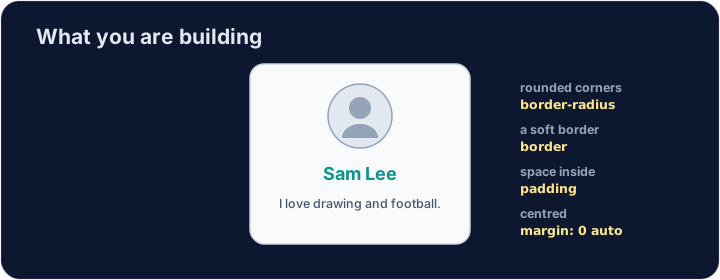
- Here is what you are aiming for:
עברית
הפרויקט הקטן שלך
- הגיע הזמן לשלב הכל יחד ולבנות כרטיס פרופיל.
- הנה מה שאתה שואף להשיג:
<style>
  .card { width: 280px; margin: 0 auto; padding: 20px; text-align: center;
          background-color: #f8fafc; border: 1px solid #cbd5e1; border-radius: 12px; }
  h2 { color: teal; margin: 8px 0; }
</style>
<div class="card">
  <img src="/static/code/web-basics/cat.svg" alt="My avatar" width="120">
  <h2>Sam Lee</h2>
  <p>I love drawing and football.</p>
</div>
English
What you've learned
- HTML: headings, paragraphs, lists, links, images, tables, forms, page structure.
- CSS: colours, text, the box model, spacing, sizing, and rows with Flexbox.
- That is the real foundation of every web page. You can build things now. 🎉
עברית
מה למדת
- HTML: כותרות, פסקאות, רשימות, קישורים, תמונות, טבלאות, טפסים ומבנה דף.
- CSS: צבעים, טקסט, מודל הקופסה, רווחים, גודל ושורות עם Flexbox.
- זוהי הבסיס האמיתי לכל דף אינטרנט. עכשיו יכולים לבנות דברים. 🎉
English
Common mistakes
- Build and check one piece at a time.
- Keep the HTML structure and the CSS styling separate.
עברית
טעויות נפוצות
- בנה ובדוק חלק אחד בכל פעם.
- שמור על הפרדה בין מבנה ה-HTML לעיצוב ה-CSS.
English
Build your card
- The card's layout is already styled, so you can focus on filling it in.
- Each task adds one piece — content, a picture, then colour. Press ▶ often!
עברית
בנה את הכרטיס שלך
- העיצוב של הכרטיס כבר מוגדר, כך שתוכל להתמקד במילואו.
- כל משימה מוסיפה חלק אחד — תוכן, תמונה, ואז צבע. לחץ על ▶ לעיתים קרובות!
Start your card. Inside the .card, add an <h2> with a name and a <p> with one line about you. · התחל את הכרטיס שלך. בתוך הקורה (.card), הוסף ⟨h1⟩ (<h2>) עם שם ו-⟨p⟩ (<p>) עם שורה אחת על עצמך.
Add a picture above the name. Add an <img src="/static/code/web-basics/cat.svg"> with alt text, just inside the card. · הוסף תמונה מעל השם. הוסף ⟨img⟩ (<img src="/static/code/web-basics/cat.svg">) עם טקסט alt, בדיוק בתוך הכרטיס.
Finish it with a splash of colour. Give the h2 a colour you like, e.g. h2 { color: teal; }. · גמר עם נגיעה של צבע. תן ל-h2 צבע שאוהב, למשל h2 { color: teal; }.