Add some style · הוסף קצת עיצוב
This page needs a recent browser (with SharedArrayBuffer support). Please update Chrome, Edge, Firefox or Safari to the latest version. · עמוד זה דורש דפדפן עדכני (תומך ב-SharedArrayBuffer). אנא עדכן את Chrome, Edge, Firefox או Safari לגרסה העדכנית ביותר.
English
Adding style
- HTML gives your page its content. CSS makes it look good.
- The easiest way to add CSS is a
<style>block near the top of your page. - Inside it, you write rules that change how things look.
עברית
הוספת עיצוב
- HTML מספק לתוכנית המידע. CSS גורם לה להיראות טוב.
- הדרך הקלה ביותר להוסיף CSS היא בלוק
<style>בקרבת ראש העמוד. - בתוכו אתה כותב כללים המשנים את המראה.
English
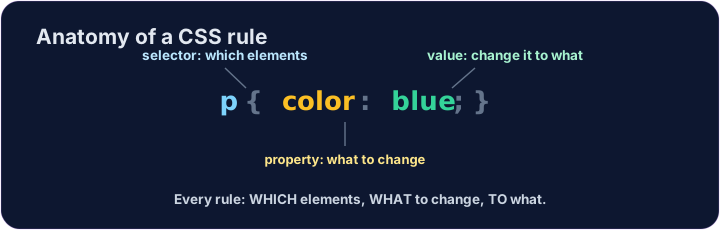
A CSS rule
- A rule has three parts:
p { color: blue; } pis the selector — which tags to change (here, every paragraph).coloris the property — what to change.blueis the value — what to change it to. (Together,color: blue;is one declaration.)
עברית
כלל CSS
- לכלל יש שלושה חלקים:
p { color: blue; } pהוא הבוחר (selector) — אילו תגים לשנות (כאן, כל פסקה).colorהוא המאפיין (property) — מה לשנות.blueהוא הערך (value) — למה לשנות אותו. (יחד,color: blue;הם הצהרה אחת.)
<style>
  p { color: blue; }
</style>
<p>Now I am blue.</p>
<p>So am I!</p>
English
Common mistakes
- Link the CSS file, or put rules inside a
<style>block. - Each CSS rule ends with a semicolon
;.
עברית
טעויות נפוצות
- קשר את קובץ ה-CSS, או הכנס כללים לתוך בלוק
<style>. - כל כלל CSS מסתיים בפסיק-נקודה
;.
English
Now you try
- Write your rules inside the
<style>block. - Colour your paragraphs, then your heading.
עברית
כעת תנסו בעצמכם
- כתוב את הכללים שלך בתוך בלוק
<style>. - צבוע את הפסקאות שלך, ואז את הכותרת.
Make every paragraph blue. Inside the <style> block, add the rule p { color: blue; }. · הפוך כל פסקה ל-כחול. בתוך בלוק ה-<style>, הוסף את הכלל p { color: blue; }.
Now colour the heading too. Add a rule h1 { color: red; }. · עכשיו צבע גם את הכותרת. הוסף כלל h1 { color: red; }.