Grouping with GROUP BY · קבוצות עם GROUP BY
Grouping rows with GROUP BY
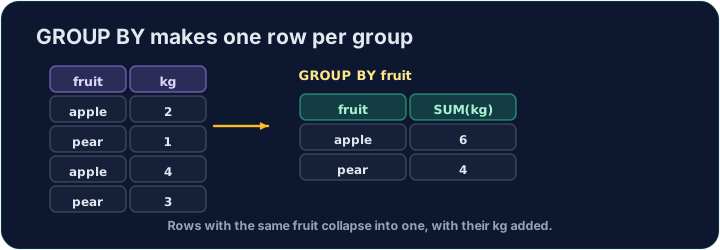
An aggregate like AVG normally summarises the whole table into one number. GROUP BY splits the rows into groups that share a value, and gives one summary row per group:
This gives one row for each form, with that form's count and average.
קבוצת שורות עם GROUP BY
פונקציית סיכום כמו AVG מצמצמת לרוב את כל הטבלה למספר אחד. GROUP BY מחלק את השורות ל-קבוצות בעלות ערך משותף, ומעניקה שורת סיכום אחת לכל קבוצה:
SELECT form, COUNT(*) AS n, ROUND(AVG(score), 2) AS avg_score
FROM student
GROUP BY form;
דבר זה יוצר שורה אחת עבור כל form, עם הספירה והממוצע של צורה זו.
Filtering groups with HAVING
WHERE filters rows before grouping. To filter the groups themselves — using an aggregate — use HAVING:
This keeps only forms with 3 or more students. (WHERE cannot test COUNT(*); HAVING can.)
סינון קבוצות עם HAVING
WHERE מסנן שורות לפני הקיבוצה. כדי לסנן את ה-קבוצות עצמן — באמצעות פונקציית סיכום — השתמש ב-HAVING:
SELECT form, COUNT(*) AS n
FROM student
GROUP BY form
HAVING COUNT(*) >= 3;
דבר זה שומר רק על צורות עם 3 סטודנטים או יותר. (WHERE לא יכול לבדוק COUNT(*); HAVING יכול.)
Common mistakes
- Filter groups with
HAVING, rows withWHERE. - A plain column beside an aggregate must be in
GROUP BY.
טעויות נפוצות
- מסנן קבוצות עם
HAVING, שורות עםWHERE. - עמודה רגילה לצד פונקציית סיכום חייבת להיות ב-
GROUP BY.
For each form, show the form, the number of students as n, and the average score (2 d.p.) as avg_score. Group by form. · עבור כל form, הצג את הצורה, את מספר הסטודנטים כn, והתוצאה הממוצעת (2 מק"מ) כavg_score. קבץ לפי form.
Click Run to see the output here. · לחץ על הרץ כדי לראות את התוצא כאן.
Show each form and its student count n, but only for forms with 3 or more students. Use HAVING. · הצג כל form ואת מספר התלמידים שלו n, אך רק לכיתות עם 3 תלמידים או יותר. השתמש בHAVING.
Click Run to see the output here. · לחץ על הרץ כדי לראות את התוצא כאן.