Counting and averaging · ספירה וממוצע
Summarising with aggregate functions
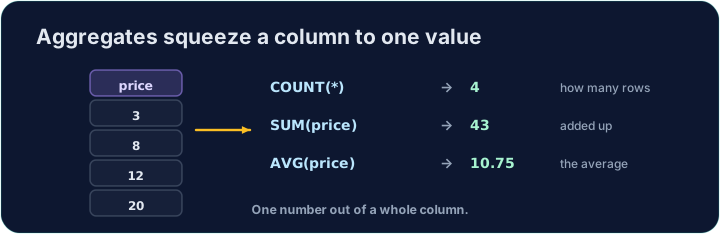
Sometimes you do not want the rows themselves, but a summary of them. Aggregate functions turn many rows into a single value:
COUNT(*)— how many rowsSUM(col)— the totalAVG(col)— the averageMIN(col)/MAX(col)— the smallest / largest
סיכום עם פונקציות אגרגט
לעיתים לא רוצים את השורות עצמן, אלא סיכום שלהן. פונקציות אגרגט ממירנות שורות רבות לערך אחד:
COUNT(*)— כמה שורותSUM(col)— הסך הכלAVG(col)— הממוצעMIN(col)/MAX(col)— הקטן ביותר / הגדול ביותר
SELECT COUNT(*) FROM student;
Naming and rounding the result
Give the result a clear heading with AS. Averages often have long decimals, so wrap them in ROUND(value, 2) to keep 2 decimal places:
You can combine several aggregates in one query.
הכונון והעיגול של התוצאה
תן לתוצאה כותרת ברורה בעזרת AS. לעיתים קרובות לממוצעים יש מספרים עשרוניים ארוכים, לכן עטוף אותם ב-ROUND(value, 2) כדי לשמור על 2 מקומות עשרוניים:
SELECT COUNT(*) AS n, ROUND(AVG(score), 2) AS avg_score
FROM student;
ניתן לשלב מספר פונקציות אגרגט בביקוש אחד.
Common mistakes
COUNT(*)counts rows;AVG(col)averages a column.- Round an average with
ROUND(x, 2).
טעויות נפוצות
COUNT(*)סופר שורות;AVG(col)מחשב ממוצע לעמודה.- עגל ממוצע עם
ROUND(x, 2).
In one query, show how many students there are as n, and their average score (to 2 decimal places) as avg_score. · בבקשה אחת, הצג כמה סטודנטים יש כn, והתוצאה הממוצעת שלהם (עד 2 מקומות עשרוני) כavg_score.
Click Run to see the output here. · לחץ על הרץ כדי לראות את התוצא כאן.
Show the lowest score as lowest, the highest as highest, and the total of all scores as total. · הצג את הציון הנמוך ביותר כlowest, הגבוה ביותר כhighest, ואת הסכום של כל הציונים כtotal.
Click Run to see the output here. · לחץ על הרץ כדי לראות את התוצא כאן.