Getting input · קבלת נתונים
Ask the user with input
input()waits for the user to type a line and press Enter.- It gives back what they typed. Store it in a variable.
- Join two strings together with
+.
בקש מהמשתמש באמצעות input
input()ממתינה למשתמש להכניס שורה וללחוץ Enter.- היא מחזירה בחזרה מה שהוזן. אחסן זאת במשתנה.
- איחוד שני מחרגות יחד עם
+.
name = input()
print("Welcome, " + name)
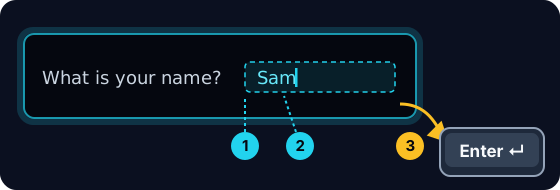
When your program waits
- When you press Run, the program stops at
input()and waits for you. - A highlighted box appears under the code: type here, then press Enter.
- Click the box, type your answer and press Enter. Then the program continues.
כאשר התוכנית שלך מחכה
- כאשר לוחצים על Run, התוכנית עצומדת ב
input()וממתין לך. - קופסה מודגשת מופיעה מתחת לקוד: הקלד כאן, ואז לחץ Enter.
- לחץ על הקופסה, הקלד את התשובה ולחץ על Enter. לאחר מכן התוכנית ממשיכה.
input always gives a string
- Whatever the user types comes back as a string.
- Even if they type
5, you get the text"5", not the number. - So
"5" + "5"is"55"(joined text), not10.
input תמיד מחזיר מחרגה
- כל מה שהמשתמש כותב חוזר כ-string (טקסט).
- גם אם הם כותבים
5, תקבל את הטקסט"5", לא את המספר. - אז
"5" + "5"הוא"55"(טקסט מאוחד), לא10.
print("5" + "5") # 55 — joined text, not the number 10
Turn text into a number
int(...)turns text into a whole number:int("5")→5.float(...)turns text into a decimal:float("2.5")→2.5.- Convert first, then you can do maths.
הפכת טקסט למספר
int(...)הופך טקסט למספר שלם:int("5")→5.float(...)ממיר טקסט למספר עשרוני:float("2.5")→2.5.- המירו קודם, ואז תוכלו לבצע חישובים מתמטיים.
age = int(input())
print(age + 1)
Common mistakes
input()always returns a string, so wrap it inint(...)before doing maths.- The text inside
input("...")is the prompt shown to the user.
טעויות נפוצות
input()מחזיר תמיד שרשורת (string), לכן הסגרו אותו בint(...)לפני ביצוע פעולות מתמטיות.- הטקסט בתוך
input("...")הוא ההנחיה המוצגת למשתמש.
Now you try
- When you Run, type the input yourself in the box and press Enter.
- Check answer types the task's input for you, so just read it with
input(). - Each task needs only one
input().
כעת תנסו בעצמכם
- כאשר הריצו, הקלידו את הקלט בעצמכם בתיבה ולחצו על Enter.
- בדיקת תשובה כותבת עבורך את הקלט של המשימה, כך שרק צריך לקרוא אותו עם
input(). - כל משימה דורשת רק אחת
input().
Input → process → output · כניסה → עיבוד → תוצאה
Most programs follow one shape: get input, do something, show output. · לרוב התוכניות עוקבות אחרי דגם אחד: קבל קלט, בצע פעולה, הצג פלט.
Read a name with input(), then print Hi, then the name then !. For the input Sam, the output should be Hi, Sam!. · קרא שם עם input(), ולאחר מכן הדפס ⟨⟩Hi, , ולאחריו את השם, ולאחריו ⟨⟩!. עבור הקלט ⟨⟩Sam, התוצאה צריכה להיות ⟨⟩Hi, Sam!.
Click Run to see the output here. · לחץ על הרץ כדי לראות את התוצא כאן.
Read a whole number with input(), convert it with int(...), then print the number plus 100. For input 7, the output should be 107. · קרא מספר שלם עם input(), המרה עם int(...), ולאחר מכן הדפס את המספר בנוסף ל-100. עבור קלט 7, הפלט אמור להיות 107.
Click Run to see the output here. · לחץ על הרץ כדי לראות את התוצא כאן.
Read a whole number, convert it with int(...), then print its square (the number times itself). For input 5, the output should be 25. · קרא מספר שלם, המרה עם int(...), ולאחר מכן הדפס את ה-ריבוע שלו (המספר כפול עצמו). עבור קלט 5, הפלט אמור להיות 25.
Click Run to see the output here. · לחץ על הרץ כדי לראות את התוצא כאן.
Read the width, then the height, each with int(input()). Print the area on one line and the perimeter on the next. For the inputs 3 and 5 the output is Area: 15 and Perimeter: 16. · קרא את ה-רוחב, ולאחר מכן את ה-גובה, כל אחד עם int(input()). הדפס את השטח בשורה אחת ואת ההיקף בשורה הבאה. עבור הקלט 3 ו-5, הפלט הוא Area: 15 ו-Perimeter: 16.
Click Run to see the output here. · לחץ על הרץ כדי לראות את התוצא כאן.