Programs and processes · תוכניות ותהליכים
This page needs a recent browser (with SharedArrayBuffer support). Please update Chrome, Edge, Firefox or Safari to the latest version. · עמוד זה דורש דפדפן עדכני (תומך ב-SharedArrayBuffer). אנא עדכן את Chrome, Edge, Firefox או Safari לגרסה העדכנית ביותר.
English
What is a process?
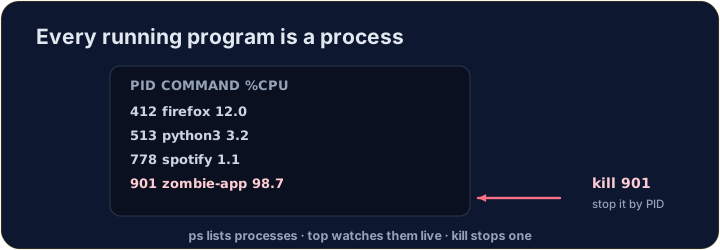
- A process is a running program. Your browser, your editor, and the shell itself are all processes.
- Each has a number — a PID (process ID) — that the system uses to keep track of it.
- (These commands talk to the real operating system, so they aren't part of our simulator — but here is what you'll use on a real machine.)
עברית
מהי תהליך?
- תהליך הוא תוכנית פעילה. הדפדפן שלך, העורך והשול (shell) עצמו הם כולם תהליכים.
- לכל אחד יש מספר — PID (זיהוי תהליך) — שמערכת ההפעלה משתמשת כדי לעקוב אחריו.
- (פקודות אלו מדברות עם מערכת ההפעלה האמיתית, לכן הן אינן חלק מהסימולטור שלנו — אך כאן תמצא את מה שתשתמש בו במכונה אמיתית.)
English
Seeing what is running
pslists your processes;ps auxlists all of them.top(or the nicerhtop) shows a live view that updates every second — handy to spot a program using too much CPU or memory:
- Press
qto quittop.
עברית
צפייה במה שרץ
psמציג את התהליכים שלך;ps auxמציג את כל התהליכים.top(או המראה היפה יותרhtop) מראה מבט חי מתעדכן בכל שנייה — שימושי לזיהוי תוכנית הצורכת יותר מדי CPU או זיכרון:
top
- לחץ על
qכדי לצאת מtop.
English
Stopping a process
- If a program is frozen, you can stop it. In the terminal, Ctrl-C stops the program running right now.
- For another process, find its PID with
psand thenkillit:
killpolitely asks the process to stop;kill -9forces it. Use force only as a last resort.
עברית
עצירת תהליך
- אם תוכנית קפאה, ניתן לעצור אותה. בשול (terminal), Ctrl-C עצור את התוכנית הפועלת כרגע.
- עבור תהליך אחר, מצא את ה-PID שלו עם
psואזkillאותו:
kill 1234
killמבקש בתרבותיות מהתהליך להיפסק;kill -9מכתיב זאת. השתמש בכוח רק כפתור אחרון.
English
Now you try
ps,topandkilltalk to the real OS, so they are not in our simulator.- Instead, a snapshot of
psoutput is saved inprocesses.txt. Use the file tools you already know —grepandwc— to find the CPU-hog and count the processes.
עברית
כעת תנסו בעצמכם
ps,topוkillמדברים עם מערכת ההפעלה האמיתית, לכן הם אינם קיימים בסימולטור שלנו.- במקום זאת, תצלום מסך של פלט
psמאוחסן בprocesses.txt. השתמש בכלי הקבצים שהכרת כבר —grepוwc— למצוא את ה-CPUs-hog ולספור את התהליכים.
English
Common mistakes
pslists running processes;killstops one by its PID.- A trailing
&runs a command in the background.
עברית
טעויות נפוצות
psמציג תהליכים פעילים;killעצור אחד לפי ה-PID שלו.&בסוף פקודה רץ פקודה ברקע.
You cannot run ps in this simulator, but a teammate saved its output to processes.txt (each line is PID name cpu%). Find the frozen, CPU-hogging firefox line with grep firefox processes.txt. · אי אפשר להריץ את ps בסیمולטור הזה, אך חבר צוות שמר את התפוקה שלו לprocesses.txt (כל שורה היא ⟨PID name cpu%⟩). מצא את השורה המקפיאה והמהירה במעבד firefox עם grep firefox processes.txt.
How many processes were running when the snapshot was taken? Count the lines with cat processes.txt | wc -l. · כמה תהליכים היו פעילים בזמן ליקחת הצילום? ספור את השורות עם cat processes.txt | wc -l.