Wildcards · מספרי מקום (Wildcards)
This page needs a recent browser (with SharedArrayBuffer support). Please update Chrome, Edge, Firefox or Safari to the latest version. · עמוד זה דורש דפדפן עדכני (תומך ב-SharedArrayBuffer). אנא עדכן את Chrome, Edge, Firefox או Safari לגרסה העדכנית ביותר.
English
One command, many files
- A wildcard is a symbol that stands for "anything". The most common is
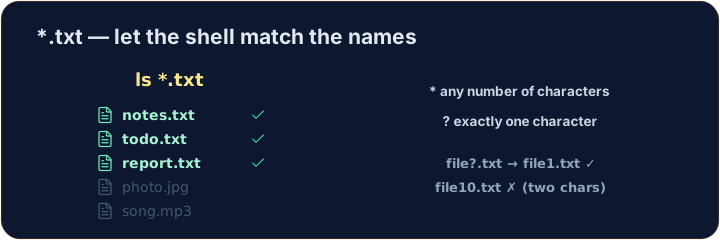
*. *.txtmeans "every name ending in.txt". The shell fills in the matches for you:
עברית
פקודה אחת, קבצים רבים
- סימן כללי הוא סמל המייצג "הכל". הנפוץ ביותר הוא
*. *.txtפירושו "כל שם שמסתיים ב-.txt". השלל ממלא את ההתאמות עבורך:
ls *.txt
English
The two main wildcards
*matches any number of characters (even none).?matches exactly one character.
- So
file?.txtmatchesfile1.txtandfileA.txt, but notfile10.txt.
עברית
שני הסימונים הכלליים העיקריים
*מתאים ל-כל מספר של תווים (גם אפס).?מתאים ל-תווה אחד בדיוק.
ls file?.txt
- לכן
file?.txtמתאים ל-file1.txtול-fileA.txt, אך לא ל-file10.txt.
English
Be careful with delete
- Wildcards are powerful — and that cuts both ways:
- That deletes every
.txtfile at once. Runls *.txtfirst to see exactly what will go.
עברית
זהירות במחיקה
- סימנים כלליים הם חזקים — ויש לכך שני צדדים:
rm *.txt
- זה ימחק את כל הקבצים
.txtבו-זמנית. הרץls *.txtקודם כדי לראות בדיוק מה יימחק.
English
Common mistakes
*matches any text and?matches one character.- Quote a name that has spaces, or the shell splits it into two.
עברית
טעויות נפוצות
*מתאים לכל טקסט ו-?מתאים לתווה אחד.- הכן שם עם רווחים, או שהשלל יפרק אותו לשניים.
List only the .txt files using the * wildcard: ls *.txt. · הרשם רק קבצי .txt באמצעות מספר המקום *: ls *.txt.
Delete all the .txt files at once with rm *.txt. The check lists what is left. · מחק את כל קבצי .txt בו-זמנית עם rm *.txt. הבדיקה תרשימה מה נותר.