Tables · טבלאות
This page needs a recent browser (with SharedArrayBuffer support). Please update Chrome, Edge, Firefox or Safari to the latest version. · עמוד זה דורש דפדפן עדכני (תומך ב-SharedArrayBuffer). אנא עדכן את Chrome, Edge, Firefox או Safari לגרסה העדכנית ביותר.
English
Tables
- A table uses the
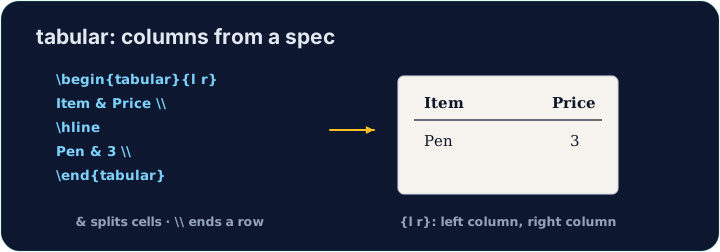
tabularenvironment. You first describe the columns:
{l c r}means three columns: left-aligned, centred, right-aligned.
עברית
טבלאות
- טבלה משתמשת בסביבת ה-
tabular. תחילה מתארים את העמודות:
\begin{tabular}{l c r}
  left & centre & right \\
\end{tabular}
- ה-
{l c r}אומר שלוש עמודות: lשמאלית, cמרכזית, rימנית.
English
Rows and cells
- Inside,
&jumps to the next column and\\starts a new row:
- The number of cells in each row must match the number of columns you declared.
עברית
שורות ותאים
- בתוך הטבלה, ה-
&עובר לעמודה הבאה וה-\\מתחיל שורה חדשה:
\begin{tabular}{l l}
  Apple & 5 \\
  Banana & 3 \\
\end{tabular}
- מספר התאים בכל שורה חייב להתאים למספר העמודות שהצהרתם.
English
Lines (optional)
- Add
|between column letters for vertical lines, and\hlinefor horizontal ones:
- For a cleaner look, professionals use the
booktabspackage instead of many lines.
עברית
קווים (אופציונלי)
- הוסיפו ה-
|בין אותיות העמודות לקו אנכי, וה-\hlineלקו אופקי:
\begin{tabular}{|l|l|}
  \hline
  Apple & 5 \\ \hline
\end{tabular}
- למראה נקי יותר, מקצוענים משתמשים בחבילת
booktabsבמקום בשורות רבות.
English
Common mistakes
tabularneeds a column spec like{lcr}; separate cells with&and end rows with\\.- The number of
&per row must fit the column spec.
עברית
טעויות נפוצות
tabularדורש הגדרת עמודות כמו{lcr}; הפרדו תאים ב-&וסיימו שורות ב-\\.- מספר ה-
&בכל שורה חייב להתאים להגדרת העמודות.
Build a small two-column table with \begin{tabular}{l l}. Separate the two cells in a row with &, and end each row with \\. Add the rows for Bob (30) and Mei (25). · בנה טבלא קטנה בעלת עמודה אחת עם \begin{tabular}{l l}. הפרד את שתי התאים בשורה באמצעות &, והשלם כל שורה עם \\. הוסף את השורות עבור בוב (30) ומיי (25).
Click Run to compile and preview the PDF. · לחץ הרצה כדי להרכיב ולהציג מראות את הקובץ.
Add lines to the table. Put \hline at the top, after the header row, and at the bottom, and use |l|l| in the column spec for vertical lines. · הוסף קווים לטבלא. הנח \hline למעלה, לאחר שורת הכותרת, ולמטה, והשתמש ב-|l|l| במפרט העמודות לקווים אנכיים.
Click Run to compile and preview the PDF. · לחץ הרצה כדי להרכיב ולהציג מראות את הקובץ.